Category: Linux

Updating iLO3 firmware on a Proliant BL685c G7 running RHEL 5

I have a ProLiant BL685c G7 and I will update iLO3 firmware

Go to http://www8.hp.com/us/en/drivers.html
Search by the product name ProLiant BL685c G7
Select your operating system. In my case Red Hat Linux Enterprise 5 Server (x86-64)
Select Firmware – Lights-Out Management and download the file

Copy the file to the server and make it executable

root@linux:~ # chmod 700 CP022551.scexe

iLO3 was running version 1.55 and was upgraded to 1.80

root@linux:~ # ./CP022551.scexe

FLASH_iLO3 v1.09 for Linux (Jan 23 2013)
(C) Copyright 2002-2013 Hewlett-Packard Development Company, L.P.
Firmware image: ilo3_180.bin
Current iLO 3 firmware version 1.55; Serial number ILOUSE253RVDV

Component XML file: CP022551.xml
CP022551.xml reports firmware version 1.80
This operation will update the firmware on the
iLO 3 in this server with version 1.80.
Continue (y/N)?y
Current firmware is 1.55 (Jan 24 2013 )
Firmware image is 0x801664(8394340) bytes
Committing to flash part…
******** DO NOT INTERRUPT! ********
Flashing completed.
Attempting to reset device.
Succeeded.
***** iLO 3 reboot in progress (may take up to 60 seconds.)
***** Please ignore console messages, if any.
iLO 3 reboot completed.

Updating firmware on an Emulex or QLogic Fibre Channel HBA on HP Proliant

I have a Linux server and I need to update the HBA card.

First we verify which model is the HBA card. It’s a dual port HBA card (same addressing but the last number differ)

root@linux:~ # lspci -k | grep -A2 -i fibre
06:00.0 Fibre Channel: Emulex Corporation Zephyr-X LightPulse Fibre Channel Host Adapter (rev 02)
Subsystem: Emulex Corporation Zephyr-X LightPulse Fibre Channel Host Adapter
Kernel driver in use: lpfc
Kernel modules: lpfc
06:00.1 Fibre Channel: Emulex Corporation Zephyr-X LightPulse Fibre Channel Host Adapter (rev 02)
Subsystem: Emulex Corporation Zephyr-X LightPulse Fibre Channel Host Adapter
Kernel driver in use: lpfc
Kernel modules: lpfc

Or

root@linux:~ # lspci -k | grep -A2 -i fibre
0c:00.0 Fibre Channel: Emulex Corporation Zephyr-X LightPulse Fibre Channel Host Adapter (rev 02)
Subsystem: Hewlett-Packard Company Device 1708
Kernel driver in use: lpfc

0c:00.1 Fibre Channel: Emulex Corporation Zephyr-X LightPulse Fibre Channel Host Adapter (rev 02)
Subsystem: Hewlett-Packard Company Device 1708
Kernel driver in use: lpfc

8b:00.0 Fibre Channel: Emulex Corporation Zephyr-X LightPulse Fibre Channel Host Adapter (rev 02)
Subsystem: Hewlett-Packard Company Device 1708
Kernel driver in use: lpfc

8b:00.1 Fibre Channel: Emulex Corporation Zephyr-X LightPulse Fibre Channel Host Adapter (rev 02)
Subsystem: Hewlett-Packard Company Device 1708
Kernel driver in use: lpfc

root@linux:~ # lspci | grep -i fibre
04:00.0 Fibre Channel: QLogic Corp. ISP2432-based 4Gb Fibre Channel to PCI Express HBA (rev 03)
04:00.1 Fibre Channel: QLogic Corp. ISP2432-based 4Gb Fibre Channel to PCI Express HBA (rev 03)
07:00.0 Fibre Channel: QLogic Corp. ISP2432-based 4Gb Fibre Channel to PCI Express HBA (rev 03)
07:00.1 Fibre Channel: QLogic Corp. ISP2432-based 4Gb Fibre Channel to PCI Express HBA (rev 03)
0a:00.0 Fibre Channel: QLogic Corp. ISP2432-based 4Gb Fibre Channel to PCI Express HBA (rev 03)
0a:00.1 Fibre Channel: QLogic Corp. ISP2432-based 4Gb Fibre Channel to PCI Express HBA (rev 03)
0d:00.0 Fibre Channel: QLogic Corp. ISP2432-based 4Gb Fibre Channel to PCI Express HBA (rev 03)
0d:00.1 Fibre Channel: QLogic Corp. ISP2432-based 4Gb Fibre Channel to PCI Express HBA (rev 03)

Verify the model description. It’s a HP FC2242SR 4Gb PCI-e DC Fibre Channel Adapter

root@linux:~ # cat /sys/class/scsi_host/host0/modeldesc
HP FC2242SR 4Gb PCI-e DC Fibre Channel Adapter
root@linux:~ # cat /sys/class/scsi_host/host1/modeldesc
HP FC2242SR 4Gb PCI-e DC Fibre Channel Adapter

root@linux:~ # cat /sys/class/scsi_host/host0/modeldesc
HP BLc Emulex LPe1105-HP FC Mezz Option Kit
root@linux:~ # cat /sys/class/scsi_host/host1/modeldesc
HP BLc Emulex LPe1105-HP FC Mezz Option Kit
root@linux:~ # cat /sys/class/scsi_host/host2/modeldesc
HP BLc Emulex LPe1105-HP FC Mezz Option Kit
root@linux:~ # cat /sys/class/scsi_host/host3/modeldesc
HP BLc Emulex LPe1105-HP FC Mezz Option Kit

root@linux:~ # cat /sys/class/scsi_host/host*/model*name
HPAE312A
HPAE312A
HPAE312A
HPAE312A
HPAE312A
HPAE312A
HPAE312A
HPAE312A

root@linux:~ # cat /sys/class/scsi_host/host*/model*desc
PCI-Express Dual Port 4Gb Fibre Channel HBA

Go to http://h20565.www2.hpe.com/portal/site/hpsc

Type FC2242SR or the model that you found. Check QLogic’s page if you search and didn’t return anything. Maybe you need to tweak the search string

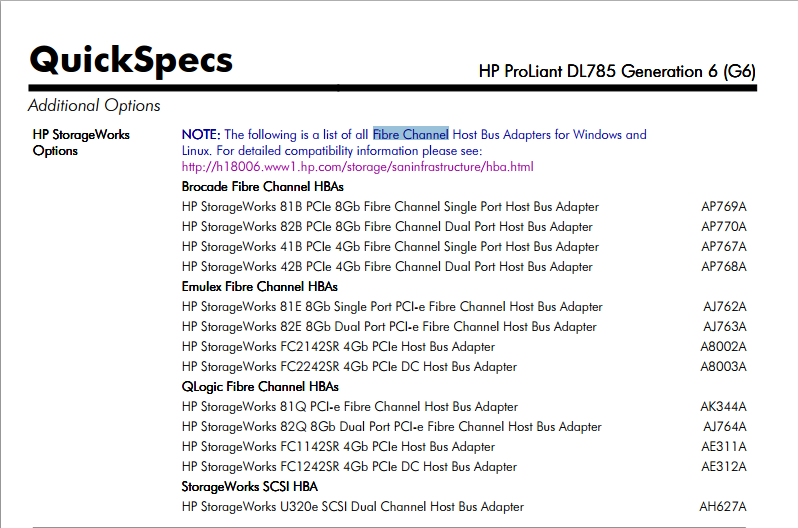
Alternatively, search for the server’s QuickSpecs. After opening the PDF, look for fibre channel. This PDF will list the HBA cards that Hewlett Packard Enterprise is selling to use with this server

fibrechannel

Choose your operating system and download the scexe file under the box Firmware – Storage Fibre Channel

Copy the file to the server and then run the file you just downloaded

root@linux:~ # ./CP022701.scexe

HP Data Protector error: [12:1625] Import host failed.

root@hp-ux:~ # omnicc -import_host suse11host.bkp
[12:1625] Import host failed.

The host information cannot be added/updated in the Cell Manager configuration file.

* Please check that the Data Protector services on the Cell Manager computer are running.
* Also check that Data Protector Inet service on the remote computer is running
(use: telnet 5555 to see if the service responds).
* Make sure that the remote client is not already part of another cell.
Afterwards use Data Protector GUI or omnicc -import_host command to manually import
the client to the selected Cell Manager.
* On NetWare make sure Data Protector directory structure is created properly
(check that directory SYS:USR\OMNI\CONFIG\CLIENT exists) or check that
localhost (127.0.0.1) entry exists in SYS:ETC\HOSTS file for servers
not using DNS IP address resolution.

[12:1051] Client security violation. Access denied.
, error=1625

Verify if file /etc/opt/omni/client/allow_hosts exists and if there is any content. Modify accordingly to your servers.

Also verify the log file from the inetd to verify the error

root@linux:/etc/xinetd.d # cat omni
service omni
{
socket_type = stream
protocol = tcp
wait = no
user = root
server = /opt/omni/lbin/inet
server_args = inet -log /var/opt/omni/log/inet.log
disable = no

instances = UNLIMITED
per_source = UNLIMITED
}

root@linux:~ # tail /var/opt/omni/log/inet.log
10/14/14 14:52:38 INET.20969.0 [“/inet/allow_deny.c $Rev: 29682 $ $Date:: 2012-03-15 19:42:59”:490] A.06.20 b409
A request 0 (INCLUDE) came from host hp-ux (172.22.19.188) which is not in AllowList: not proceeding with this request!
[Critical] From: INET@linux “” Time: 10/14/14 14:52:38
[12:1051] Client security violation. Access denied.

Linux – route add error: SIOCADDRT: No such process

I was being shown this message but I knew the operating system was refusing to add the route

root@linux:~ # route add -net 172.22.1.0 gw 172.22.18.1 netmask 255.255.255.0 dev eth1
SIOCADDRT: No such process

I added the route to /etc/sysconfig/network/routes and then restarted the network service

192.168.1.1 192.168.233.2 255.255.255.255 eth1
148.91.0.0 172.22.18.1 255.255.0.0 eth1
207.169.17.0 172.22.18.1 255.255.255.0 eth1
172.22.0.0 172.22.18.1 255.255.255.0 eth1
172.22.14.0 172.22.18.1 255.255.255.0 eth1
172.22.1.0 172.22.18.1 255.255.255.0 eth1
default 172.22.240.1 – –

Turn on disk UID on an HP Smart Array Controller

I have an HP ProLiant DL580 G3 and a disk had to be replaced.

It was identified the disk to be replaced was the Physicaldrive 2:2

root@linux:~ # hpacucli ctrl all show config

Smart Array 642 in Slot 3 (sn: P92260PXQS4036)

array A (Parallel SCSI, Unused Space: 0 MB)

logicaldrive 1 (273.5 GB, RAID 5, OK)

physicaldrive 2:0 (port 2:id 0 , Parallel SCSI, 146.8 GB, OK)
physicaldrive 2:1 (port 2:id 1 , Parallel SCSI, 146.8 GB, OK)
physicaldrive 2:2 (port 2:id 2 , Parallel SCSI, 146.8 GB, OK)

To turn on the disk UID, identify the controller and physical drive location

root@linux:~ # hpacucli ctrl slot=3 pd 2:2 modify led=on

To turn off the disk UID, identify the controller and physical drive location

root@linux:~ # hpacucli ctrl slot=3 pd 2:2 modify led=off

HPOM – UXMON: The number of Open LV and Current LV is different for VG: rootvg

Node : linux.setaoffice.com
Node Type : Intel/AMD x64(HTTPS)
Severity : major
OM Server Time: 2014-08-15 15:46:22
Message : UXMON: The number of Open LV and Current LV is different for VG: rootvg
Msg Group : OS
Application : volmon
Object : LV
Event Type :
not_found

Instance Name :
not_found

Instruction : The module VOLMON has detected an inconsistence between the number of LV and the number
of current LV. Please make some UX expert verify this inconsistence due there is a risk
of data corruption

Verify the volume group described in the alarm

root@linux:~ # vgdisplay rootvg
— Volume group —
VG Name rootvg
System ID
Format lvm2
Metadata Areas 1
Metadata Sequence No 13
VG Access read/write
VG Status resizable
MAX LV 0
Cur LV 12
Open LV 11
Max PV 0
Cur PV 1
Act PV 1
VG Size 273.12 GB
PE Size 32.00 MB
Total PE 8740
Alloc PE / Size 6343 / 198.22 GB
Free PE / Size 2397 / 74.91 GB
VG UUID slQEGO-0Ly3-vfXf-1GaD-Kb1O-hoOa-4qkKyH

The number of Current Logical Volues is different from the number of Open Logical Volumes. Verify if there is an unmounted logical volume.

If you want to exclude this check, edit /var/opt/OV/conf/OpC/vol_mon.cfg

root@linux:~ # vi /var/opt/OV/conf/OpC/vol_mon.cfg
exclude_lv_no_check rootvg

Scanning for new disk in a VMware host running Suse Linux 10 SP4

Scanning for new disk in a VMware host running Suse 10 SP4

root@linux:~ # cat /etc/*release
SUSE Linux Enterprise Server 10 (x86_64)
VERSION = 10
PATCHLEVEL = 4
LSB_VERSION=”core-2.0-noarch:core-3.0-noarch:core-2.0-x86_64:core-3.0-x86_64″

I use the following command to scan the SCSI bus

root@linux:~ # echo “- – -” > /sys/class/scsi_host/host0/scan

List the disks. It’s the last one

root@linux:~ # fdisk -l

Then I make a partition for the disk. The first time, when there is not a valid DOS partition I like to write and call fdisk again

root@linux:~ # fdisk /dev/sdf
Device contains neither a valid DOS partition table, nor Sun, SGI or OSF disklabel
Building a new DOS disklabel. Changes will remain in memory only,
until you decide to write them. After that, of course, the previous
content won’t be recoverable.

The number of cylinders for this disk is set to 9137.
There is nothing wrong with that, but this is larger than 1024,
and could in certain setups cause problems with:
1) software that runs at boot time (e.g., old versions of LILO)
2) booting and partitioning software from other OSs
(e.g., DOS FDISK, OS/2 FDISK)
Warning: invalid flag 0x0000 of partition table 4 will be corrected by w(rite)

Command (m for help): w
The partition table has been altered!

Calling ioctl() to re-read partition table.
Syncing disks.

Running again and this time creating the partition

root@linux:~ # fdisk /dev/sdf

The number of cylinders for this disk is set to 9137.
There is nothing wrong with that, but this is larger than 1024,
and could in certain setups cause problems with:
1) software that runs at boot time (e.g., old versions of LILO)
2) booting and partitioning software from other OSs
(e.g., DOS FDISK, OS/2 FDISK)

Command (m for help): n
Command action
e extended
p primary partition (1-4)
p
Partition number (1-4): 1
First cylinder (1-9137, default 1):
Using default value 1
Last cylinder or +size or +sizeM or +sizeK (1-9137, default 9137):
Using default value 9137

Command (m for help): t
Selected partition 1
Hex code (type L to list codes): 8e
Changed system type of partition 1 to 8e (Linux LVM)

Command (m for help): w
The partition table has been altered!

Calling ioctl() to re-read partition table.
Syncing disks.

Add the partition to LVM

root@linux:~ # pvcreate /dev/sdf1
Physical volume “/dev/sdf1” successfully created

Verify the file system size

root@linux:~ # df -h /usr/oradata/oradvt061t
Filesystem Size Used Avail Use% Mounted on
/dev/mapper/softwarevg-dvt061lv
168G 133G 26G 84% /usr/oradata/oradvt061t

Add the disk to the volume group

root@linux:~ # vgextend softwarevg /dev/sdf1
Volume group “softwarevg” successfully extended

See the characteristics of the volume group

root@linux:~ # vgdisplay softwarevg
— Volume group —
VG Name softwarevg
System ID
Format lvm2
Metadata Areas 4
Metadata Sequence No 11
VG Access read/write
VG Status resizable
MAX LV 0
Cur LV 4
Open LV 4
Max PV 0
Cur PV 4
Act PV 4
VG Size 385.98 GB
PE Size 4.00 MB
Total PE 98810
Alloc PE / Size 69376 / 271.00 GB
Free PE / Size 29434 / 114.98 GB
VG UUID 0BsKwN-18al-1TT8-gctq-fRK4-ccJl-fNXL6g

And the disk added

root@dsv080:~ # pvdisplay /dev/sdf1
— Physical volume —
PV Name /dev/sdf1
VG Name softwarevg
PV Size 69.99 GB / not usable 793.00 KB
Allocatable yes
PE Size (KByte) 4096
Total PE 17918
Free PE 17918
Allocated PE 0
PV UUID 21Q3wb-2tKn-xUdP-9ZBa-tqbp-vhvS-MhSbVt

Increase the logical volume using the new disk

root@linux:~ # lvextend -l +17918 /dev/softwarevg/dvt061lv
Extending logical volume dvt061lv to 239.99 GB
Logical volume dvt061lv successfully resized

Then resize the file system

root@linux:~ # ext2online /dev/softwarevg/dvt061lv
ext2online v1.1.18 – 2001/03/18 for EXT2FS 0.5b

Verify the file system size

root@linux:~ # df -h /usr/oradata/oradvt061t
Filesystem Size Used Avail Use% Mounted on
/dev/mapper/softwarevg-dvt061lv
237G 133G 92G 60% /usr/oradata/oradvt061t
abrtd and abrt showing Corrupted or bad directory in /var/log/messages

Jul 24 10:52:12 rhel6 abrtd: New client connected
Jul 24 10:52:12 rhel6 abrt-server[66371]: Saved Python crash dump of pid 66370 to /var/spool/abrt/pyhook-2014-07-24-10:52:12-66370
Jul 24 10:52:12 rhel6 abrtd: Directory ‘pyhook-2014-07-24-10:52:12-66370’ creation detected
Jul 24 10:52:27 rhel6 abrtd: Sending an email…
Jul 24 10:52:27 rhel6 abrtd: Email was sent to: root@localhost
Jul 24 10:52:27 rhel6 abrtd: Duplicate: UUID
Jul 24 10:52:27 rhel6 abrtd: DUP_OF_DIR: /var/spool/abrt/pyhook-2014-06-12-14:10:18-27149
Jul 24 10:52:27 rhel6 abrtd: Corrupted or bad directory ‘/var/spool/abrt/pyhook-2014-07-24-10:47:08-41575’, deleting
Jul 24 10:54:44 rhel6 abrt: detected unhandled Python exception in ‘/usr/share/rhn/up2date_client/hardware.py’

You need to update the package rhn-client-tools and its dependencies.

root@rhel6:~ # yum update rhn-client-tools
root@rhel6:~ # service rhnsd restart

Souce: https://access.redhat.com/solutions/506353

Mirroring RHN repositories

To mirror the repository for RHEL 5, run the command below

root@rhel5:~# reposync -p /redhat –repoid=rhel-x86_64-server-5 -l

[rhel-x86_64-server-5: 12937 of 16070 ] Skipping existing getPackage/samba3x-3.6.6-0.139.el5_10.x86_64.rpm
[rhel-x86_64-server-5: 12938 of 16070 ] Downloading getPackage/samba3x-3.6.6-0.140.el5_10.x86_64.rpm
samba3x-3.6.6-0.140.el5_10.x86_64.rpm | 5.9 MB 00:25
[rhel-x86_64-server-5: 12939 of 16070 ] Skipping existing getPackage/samba3x-client-3.3.8-0.51.el5.x86_64.rpm

It will create a directory with the name of the channel

root@rhel5:~# ls -l /redhat
total 2914724
drwxr-xr-x 3 root root 4096 Jul 31 2013 rhel-x86_64-server-5

After you download all the packages, create the database for the packages

root@rhel5:~ # createrepo –database /redhat/rhel-x86_64-server-5/getPackage/
16070/16070 – gcc-objc++-4.1.2-46.el5.x86_64.rpm
Saving Primary metadata
Saving file lists metadata
Saving other metadata

And verify it to see if there is a problem

root@rhel5:~ # verifytree /redhat/rhel-x86_64-server-5/getPackage/
Loaded plugins: product-id, rhnplugin
Checking repodata:
verifying repomd.xml with yum
verifying filelists checksum
verifying primary checksum
verifying primary_db checksum
verifying other_db checksum
verifying other checksum
verifying filelists_db checksum
Checking groups (comps.xml):
verifying comps.xml with yum
comps file missing or unparseable

As of today, July 17th 2014, you need 34GB for RHEL 5

root@rhel5:/redhat/rhel-x86_64-server-5 # du -sh .
34G .

Same steps for Red Hat Enterprise Linux 6

root@rhel6:~ # reposync -p /redhat –repoid=rhel-x86_64-server-6 -l

root@rhel6:~ # createrepo –database /redhat/rhel-x86_64-server-6/getPackage/
Spawning worker 0 with 12900 pkgs
Workers Finished
Gathering worker results

Saving Primary metadata
Saving file lists metadata
Saving other metadata
Generating sqlite DBs
Sqlite DBs complete

root@rhel6:~ # verifytree /redhat/rhel-x86_64-server-6/getPackage/
Loaded plugins: product-id, refresh-packagekit, rhnplugin
This system is receiving updates from RHN Classic or RHN Satellite.
Checking repodata:
verifying repomd.xml with yum
verifying filelists checksum
verifying primary checksum
verifying other checksum
verifying filelists_db checksum
verifying primary_db checksum
verifying other_db checksum
Checking groups (comps.xml):
verifying comps.xml with yum
comps file missing or unparseable

As of today, July 17th 2014, you need 21GB for RHEL 6

root@rhel6:/redhat/rhel-x86_64-server-6/getPackage # du -sh .
21G .

Received disconnect from host: 2: bind: Permission denied

I was receiving the error message Received disconnect from host: 2: bind: Permission denied when trying to connect using ssh.

Received disconnect from 172.16.36.110: 2: bind: Permission denied

root@linux:~ # rpm -q openssh
openssh-4.2p1-18.38.3

root@linux:~ # cat /etc/*release
SUSE Linux Enterprise Server 10 (x86_64)
VERSION = 10
PATCHLEVEL = 2
LSB_VERSION=”core-2.0-noarch:core-3.0-noarch:core-2.0-x86_64:core-3.0-x86_64″

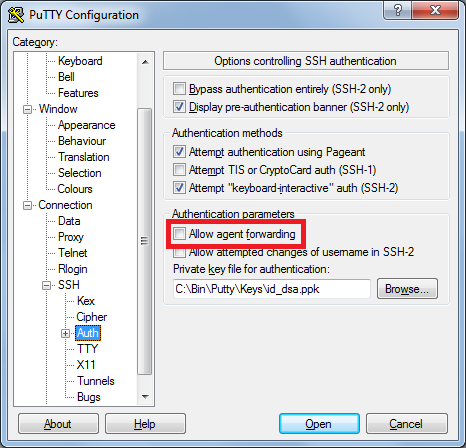
I solved this problem unchecking Allow agent forwarding
Allow Agent Forwarding