Category: Hardware

Error when updating iLO2 in HP Proliant

Tried to update iLO2 but when I ran the scexe file it gave me an error message

root@suse10:/tmp # ./CP025666.scexe

FLASH_iLO2 v1.12 for Linux (Aug 31 2009)
Copyright 2009 Hewlett-Packard Development Company, L.P.
Firmware image: ilo2_227.bin

ERROR: Make sure hp Lights-Out driver is installed and loaded. Also, execute the utility as ‘root’. []

Component XML file: CP025666.xml
CP025666.xml reports firmware version 2.27

***Flash firmware using channel interface has failed. Try direct flash next…

***Note: This operation will flash the firmware on the
iLO 2 in this server with version “2.27”.
This operation requires following condition(s) be met:
1. iLO 2 Security Override Switch must be set.
Continue (y/N)? y
Trying to reset V850E

The solution was to extract the .bin file and then update iLO 2 through the web interface with the .bin file

root@suse10:/tmp # ./CP025666.scexe –unpack=/tmp
CP025666.xml
flash_ilo2
ilo2_227.bin
README.TXT

Changing HP Proliant serial number

If you want to do it online, with some tool under Linux, it can’t be done.

Unless you have an HP Proliant 100 series, you need to enter the RBSU and change the serial number.

Setsys Utility for HP ProLiant 100 series G5 and G6 Servers

Always remember to change the serial number back when replacing the system board.

How to configure VDSL2 modem to connect to Live TIM in Brazil

If you want to buy a modem to use with Live TIM in Brazil you need to make sure you’re buying a VDSL2 modem.

If you buy an ADSL2 or an ADSL2+ modem, it will not work.

You need the following information to make a connection in your modem

ATM Configuration

VPI(0-255):0
VCI(32-65535):41

PPPoE

PPP Username: guest
PPP Password: guest

Discover disk model to replace in an HP Proliant running Linux

You ran hpacucli to verify the internal disks in an HP Proliant Server and one of them is failed.

root@linux:~ # hpacucli ctrl all show config
Smart Array P410i in Slot 0 (Embedded) (sn: 5001438013FD2D00)

array A (SAS, Unused Space: 0 MB)

logicaldrive 1 (279.4 GB, RAID 1, Interim Recovery Mode)

physicaldrive 1I:1:1 (port 1I:box 1:bay 1, SAS, 300 GB, Failed)
physicaldrive 1I:1:2 (port 1I:box 1:bay 2, SAS, 300 GB, OK)

SEP (Vendor ID PMCSIERA, Model SRC 8x6G) 250 (WWID: 5001438013FD2D0F)

To discover the hard disk model, run hpacucli ctrl all show config detail and look for the physical drive model

root@linux:~ # hpacucli ctrl all show config detail

Smart Array P410i in Slot 0 (Embedded)
Bus Interface: PCI
Slot: 0
Serial Number: 5001438013FD2D00
Cache Serial Number: PBCDH0CRH1TCEG
RAID 6 (ADG) Status: Disabled
Controller Status: OK
Hardware Revision: C
Firmware Version: 5.76
Rebuild Priority: Medium
Expand Priority: Medium
Surface Scan Delay: 3 secs
Surface Scan Mode: Idle
Queue Depth: Automatic
Monitor and Performance Delay: 60 min
Elevator Sort: Enabled
Degraded Performance Optimization: Disabled
Inconsistency Repair Policy: Disabled
Wait for Cache Room: Disabled
Surface Analysis Inconsistency Notification: Disabled
Post Prompt Timeout: 15 secs
Cache Board Present: True
Cache Status: OK
Cache Ratio: 25% Read / 75% Write
Drive Write Cache: Disabled
Total Cache Size: 512 MB
Total Cache Memory Available: 400 MB
No-Battery Write Cache: Disabled
Cache Backup Power Source: Capacitors
Battery/Capacitor Count: 1
Battery/Capacitor Status: OK
SATA NCQ Supported: True

Array: A
Interface Type: SAS
Unused Space: 0 MB
Status: Failed Physical Drive
Array Type: Data

One of the drives on this array have failed or has been removed.

Logical Drive: 1
Size: 279.4 GB
Fault Tolerance: 1
Heads: 255
Sectors Per Track: 32
Cylinders: 65535
Strip Size: 256 KB
Full Stripe Size: 256 KB
Status: Interim Recovery Mode
Caching: Enabled
Unique Identifier: 600508B1001CD2D750A3CD6D749784BC
Disk Name: /dev/cciss/c0d0
Mount Points: /boot 250 MB
OS Status: LOCKED
Logical Drive Label: AEB333F050014380108763703899
Mirror Group 0:
physicaldrive 1I:1:1 (port 1I:box 1:bay 1, SAS, 300 GB, Failed)
Mirror Group 1:
physicaldrive 1I:1:2 (port 1I:box 1:bay 2, SAS, 300 GB, OK)
Drive Type: Data

physicaldrive 1I:1:1
Port: 1I
Box: 1
Bay: 1
Status: Failed
Last Failure Reason: Write retries failed
Drive Type: Data Drive
Interface Type: SAS
Size: 300 GB
Rotational Speed: 10000
Firmware Revision: HPD4
Serial Number: ECA1PC20D4NR1205
Model: HP EG0300FBDSP
Current Temperature (C): 25
Maximum Temperature (C): 36
PHY Count: 2
PHY Transfer Rate: 6.0Gbps, Unknown

physicaldrive 1I:1:2
Port: 1I
Box: 1
Bay: 2
Status: OK
Drive Type: Data Drive
Interface Type: SAS
Size: 300 GB
Rotational Speed: 10000
Firmware Revision: HPD4
Serial Number: EB01PC20V2RK1205
Model: HP EG0300FBDSP
Current Temperature (C): 28
Maximum Temperature (C): 35
PHY Count: 2
PHY Transfer Rate: 6.0Gbps, Unknown

SEP (Vendor ID PMCSIERA, Model SRC 8x6G) 250
Device Number: 250
Firmware Version: RevC
WWID: 5001438013FD2D0F
Vendor ID: PMCSIERA
Model: SRC 8x6G

Then go to HP/Compaq Hard Disk Drives – Hard Drive Model Number Matrix and search for the hard drive model that showed when you got the details.

If you didn’t find the disk on the list, try this other list – HP/Compaq SCSI Hard Disk Drives – Hard Drive Model Number Matrix

EG0300FARTT – 507284-001

hpacucli Error: No controllers detected

I have a HP Proliant server that is using hardware RAID for the boot disk but when I used hpacucli no status was shown

root@linux:~ # hpacucli ctrl all show config

Error: No controllers detected.

Verified if I have RAID and the server model

root@linux:~ # lspci | grep -i raid
02:00.0 RAID bus controller: Hewlett-Packard Company Smart Array Gen8 Controllers (rev 01)

root@linux:~ # dmidecode | grep -i proliant
Product Name: ProLiant DL380p Gen8
Family: ProLiant

I had hpacucli 8.70 and I read that old versions that causes problems like this. So I uninstalled

root@linux:~ # rpm -qa | grep hpacucli
hpacucli-8.70-8.0.i386

root@linux:~ # rpm -e hpacucli

And installed the newest version

root@linux:~ # rpm -ivh /tmp/hpacucli-9.40-12.0.x86_64.rpm
Preparing… ########################################### [100%]
1:hpacucli ########################################### [100%]

DOWNGRADE NOTE: To downgrade this application to any version prior to 9.10.x.x, the current RPM must be manually uninstalled using the “rpm -e” command before any prior versions can be installed.

LOCKING NOTE: The locking mechanism starting with versions 9.10.X.X, are not compatible with prior versions of the applications. Therefore, mixing older and newer versions of the various applications (ACU, HPACUCLI, HPACUSCRIPTING) is not recommended.

After this, the utility was showing my drives

root@linux:~ # hpacucli ctrl all show config

Smart Array P420i in Slot 0 (Embedded) (sn: 001438027AE8760)

array A (SAS, Unused Space: 0 MB)

logicaldrive 1 (279.4 GB, RAID 1, OK)

physicaldrive 1I:2:1 (port 1I:box 2:bay 1, SAS, 300 GB, OK)
physicaldrive 1I:2:2 (port 1I:box 2:bay 2, SAS, 300 GB, OK)

SEP (Vendor ID PMCSIERA, Model SRCv8x6G) 380 (WWID: 5001438027AE876F)

Check if the server is not a VMware virtual guest. The server has become to virtual in one case.

root@linux:~ # dmidecode –type system | grep Manufacturer
Manufacturer: VMware, Inc.

And I also have a Proliant Gen9 and it shows the message Error: No controllers detected.

root@linux:~ # dmidecode | grep -i proliant
Product Name: ProLiant BL460c Gen9
Family: ProLiant
HP ProLiant System/Rack Locator

I’m using the hpacucli v. 9.40

root@linux:~ # rpm -q hpacucli
hpacucli-9.40-12.0.x86_64

Use the command hpssacli to check the disks in the disk array

root@linux:~ # hpssacli ctrl all show config

Dynamic Smart Array B140i in Slot 0b ()

Port Name: P1I

Port Name: P2I

Port Name: P3I

Port Name: P4I

Internal Drive Cage at Port 1I, Box 0, OK
array A (Solid State SATA, Unused Space: 0 MB)

logicaldrive 1 (59.6 GB, RAID 1, OK)

physicaldrive P3I:0:9 (port P3I:box 0:bay 9, Solid State SATA, 64.0 GB, OK)
physicaldrive P4I:0:10 (port P4I:box 0:bay 10, Solid State SATA, 64.0 GB, OK)

Install the hpssacli package

root@linux:~ # which hpssacli
/usr/sbin/hpssacli
root@linux:~ # rpm -qf /usr/sbin/hpssacli
hpssacli-2.30-6.0.x86_64

Description for hpacucli and hpssacli

root@linux:~ # rpm -qi hpacucli
Name : hpacucli Relocations: (not relocatable)
Version : 9.40 Vendor: Hewlett-Packard Company
Release : 12.0 Build Date: Thu 13 Dec 2012 04:17:02 PM EST
Install Date: Wed 28 Oct 2015 02:43:48 PM EDT Build Host: lxminion01
Group : Applications/System Source RPM: hpacucli-9.40-12.0.src.rpm
Size : 19635298 License: See hpacucli.license
Signature : DSA/SHA1, Wed 20 Mar 2013 10:33:51 AM EDT, Key ID 527bc53a2689b887
Packager : Hewlett-Packard Company
URL : http://www.hp.com/linux
Summary : HP Command Line Array Configuration Utility
Description :
The HP Command Line Array Configuration Utility is the disk
array configuration program for Array Controllers.
root@linux:~ # rpm -qi hpssacli
Name : hpssacli Relocations: (not relocatable)
Version : 2.30 Vendor: Hewlett-Packard Company
Release : 6.0 Build Date: Fri 17 Jul 2015 04:29:32 PM EDT
Install Date: Wed 28 Oct 2015 02:43:47 PM EDT Build Host: localhost
Group : Applications/System Source RPM: hpssacli-2.30-6.0.src.rpm
Size : 29626310 License: See hpssacli.license
Signature : RSA/SHA1, Fri 02 Oct 2015 09:59:35 AM EDT, Key ID fadd8d64b1275ea3
Packager : Hewlett-Packard Company
URL : http://www.hp.com/linux
Summary : HP Command Line Smart Storage Administrator
Description :
The HP Command Line Array Configuration Utility is the disk
array configuration program for Array Controllers.

Migrating from RAID 0 to RAID 1 in an HP Smart Array

I have two disks in an HP Smart Array P410 and one disk is configured as a logicaldrive.

root@linux:~ # hpacucli ctrl all show config

Smart Array P410i in Slot 0 (Embedded) (sn: 5001438010849BE0)

array A (SAS, Unused Space: 0 MB)

logicaldrive 1 (279.4 GB, RAID 0, OK)

physicaldrive 1I:1:1 (port 1I:box 1:bay 1, SAS, 300 GB, OK)

unassigned

physicaldrive 1I:1:3 (port 1I:box 1:bay 3, SAS, 300 GB, OK)

In order to do that, I’ll add the drive to the logical drive using the command below. Note that I can’t using the current configuration.

root@linux:~ # hpacucli ctrl slot=0 ld 1 add drives=1I:1:3

Error: This operation is not supported with the current configuration. Use the
“show” command on devices to show additional details about the
configuration.

I also try to modify the RAID to RAID 1 in this logical drive.

root@linux:~ # hpacucli ctrl slot=0 ld 1 modify raid=1

Error: This operation is not supported with the current configuration. Use the
“show” command on devices to show additional details about the
configuration.

According to Smart Array P410i Controller Technical Specifications

The HP Smart Array P410 is an 8 Port Serial Attached SCSI (SAS) RAID controller. The P410 is designed for RAID applications and can be upgraded with the 512MB battery-backed write cache (BBWC) or 512MB / 1GB flash-backed write cache (FBWC) and the Smart Array Advanced Pack.

Management Features:
Online array expansion (with BBWC/FBWC upgrade)
Online Advanced Capacity Expansion (with BBWC/FBWC and Smart Array Advanced Pack upgrade)
Online logical drive extension (with BBWC/FBWC upgrade)
Online RAID level migration (with BBWC/FBWC upgrade)
Online strip size migration (with BBWC/FBWC upgrade)
Offline Mirror splitting and recombining (with BBWC/FBWC and Smart Array Advanced Pack upgrade)
Unlimited global online spare assignment
User selectable expand and rebuild priority
User selectable RAID level and stripe size
User selectable read and write cache sizes

That means that you must have the Battery-Based Write Cache  (BBWC) or Flash-Based Write Cache (FBWC) upgrade in order to do that.

To check if you have BBWC, run hpacucli ctrl all show config detail and verify if it shows Battery/Capacitor Count: 1

Emulex OneConnect initialization failed

I have a HP Proliant BL685C G7 and both network interfaces are missing.

Rebooted the server and it showed some messages from the network card

be2net 0000:05:00.0 Waiting for POST, 58s elapsed
be2net 0000:05:00.0 POST timeout; stage=0xb00
be2net 0000:05:00.0 PCI INT A disabled
be2net 0000:05:00.0 Emulex OneConnect initialization failed
be2net: probe of 0000:05:00.0 failed with error -1
ACPI: PCI Interrupt Link [I031] enabled at IRQ 29

According to this document HP Store All Storage – Interface ETH 4 and ETH 5 are Missing it is a physical hardware failure and you need to contact HP – even though that the affected equipment is a storage I believe it is the same case with the server.

There is also another document be2net Driver Fails to Initialize where it shows that the NIC fails to initiate and asks you to update to update to a newer kernel or upgrade the NIC firmware. In this case the server’s OS was upgraded recently and firmware updated.

be2net 0000:10:00.0: Emulex OneConnect 10Gbps NIC initialization failed
be2net: probe of 0000:10:00.0 failed with error -1

hpacucli takes a long time to respond

If run hpacucli and your server is taking a long time to respond, it is because HP decided to change the hpacucli utility to scan multiple LUNs connected via Fibre or iSCSI storage

root@linux:~ # time hpacucli ctrl all show config

Smart Array P410i in Slot 0 (Embedded) (sn: 500143801176C960)

array A (SAS, Unused Space: 0 MB)

logicaldrive 1 (136.7 GB, RAID 1, OK)

physicaldrive 1I:1:1 (port 1I:box 1:bay 1, SAS, 146 GB, OK)
physicaldrive 1I:1:2 (port 1I:box 1:bay 2, SAS, 146 GB, OK)

SEP (Vendor ID PMCSIERA, Model SRC 8x6G) 250 (WWID: 500143801176C96F)

real 2m25.058s
user 0m0.083s
sys 0m0.071s

Type INFOMGR_BYPASS_NONSA=1 to disable the scan hpacucli. To reenable type export -n INFOMGR_BYPASS_NONSA

root@linux:~# export INFOMGR_BYPASS_NONSA=1
root@linux:~# time hpacucli ctrl all show config

Smart Array P410i in Slot 0 (Embedded) (sn: 50014380226F2BA0)

array A (SAS, Unused Space: 0 MB)

logicaldrive 1 (279.4 GB, RAID 1, OK)

physicaldrive 1I:1:1 (port 1I:box 1:bay 1, SAS, 300 GB, OK)
physicaldrive 1I:1:2 (port 1I:box 1:bay 2, SAS, 300 GB, OK)

SEP (Vendor ID PMCSIERA, Model SRC 8x6G) 250 (WWID: 50014380226F2BAF)

real 0m0.931s
user 0m0.130s
sys 0m0.167s

Source: http://h20564.www2.hp.com/hpsc/doc/public/display?docId=emr_na-c03696601

Updating iLO3 firmware on a Proliant BL685c G7 running RHEL 5

I have a ProLiant BL685c G7 and I will update iLO3 firmware

Go to http://www8.hp.com/us/en/drivers.html
Search by the product name ProLiant BL685c G7
Select your operating system. In my case Red Hat Linux Enterprise 5 Server (x86-64)
Select Firmware – Lights-Out Management and download the file

Copy the file to the server and make it executable

root@linux:~ # chmod 700 CP022551.scexe

iLO3 was running version 1.55 and was upgraded to 1.80

root@linux:~ # ./CP022551.scexe

FLASH_iLO3 v1.09 for Linux (Jan 23 2013)
(C) Copyright 2002-2013 Hewlett-Packard Development Company, L.P.
Firmware image: ilo3_180.bin
Current iLO 3 firmware version 1.55; Serial number ILOUSE253RVDV

Component XML file: CP022551.xml
CP022551.xml reports firmware version 1.80
This operation will update the firmware on the
iLO 3 in this server with version 1.80.
Continue (y/N)?y
Current firmware is 1.55 (Jan 24 2013 )
Firmware image is 0x801664(8394340) bytes
Committing to flash part…
******** DO NOT INTERRUPT! ********
Flashing completed.
Attempting to reset device.
Succeeded.
***** iLO 3 reboot in progress (may take up to 60 seconds.)
***** Please ignore console messages, if any.
iLO 3 reboot completed.

Updating firmware on an Emulex or QLogic Fibre Channel HBA on HP Proliant

I have a Linux server and I need to update the HBA card.

First we verify which model is the HBA card. It’s a dual port HBA card (same addressing but the last number differ)

root@linux:~ # lspci -k | grep -A2 -i fibre
06:00.0 Fibre Channel: Emulex Corporation Zephyr-X LightPulse Fibre Channel Host Adapter (rev 02)
Subsystem: Emulex Corporation Zephyr-X LightPulse Fibre Channel Host Adapter
Kernel driver in use: lpfc
Kernel modules: lpfc
06:00.1 Fibre Channel: Emulex Corporation Zephyr-X LightPulse Fibre Channel Host Adapter (rev 02)
Subsystem: Emulex Corporation Zephyr-X LightPulse Fibre Channel Host Adapter
Kernel driver in use: lpfc
Kernel modules: lpfc

Or

root@linux:~ # lspci -k | grep -A2 -i fibre
0c:00.0 Fibre Channel: Emulex Corporation Zephyr-X LightPulse Fibre Channel Host Adapter (rev 02)
Subsystem: Hewlett-Packard Company Device 1708
Kernel driver in use: lpfc

0c:00.1 Fibre Channel: Emulex Corporation Zephyr-X LightPulse Fibre Channel Host Adapter (rev 02)
Subsystem: Hewlett-Packard Company Device 1708
Kernel driver in use: lpfc

8b:00.0 Fibre Channel: Emulex Corporation Zephyr-X LightPulse Fibre Channel Host Adapter (rev 02)
Subsystem: Hewlett-Packard Company Device 1708
Kernel driver in use: lpfc

8b:00.1 Fibre Channel: Emulex Corporation Zephyr-X LightPulse Fibre Channel Host Adapter (rev 02)
Subsystem: Hewlett-Packard Company Device 1708
Kernel driver in use: lpfc

root@linux:~ # lspci | grep -i fibre
04:00.0 Fibre Channel: QLogic Corp. ISP2432-based 4Gb Fibre Channel to PCI Express HBA (rev 03)
04:00.1 Fibre Channel: QLogic Corp. ISP2432-based 4Gb Fibre Channel to PCI Express HBA (rev 03)
07:00.0 Fibre Channel: QLogic Corp. ISP2432-based 4Gb Fibre Channel to PCI Express HBA (rev 03)
07:00.1 Fibre Channel: QLogic Corp. ISP2432-based 4Gb Fibre Channel to PCI Express HBA (rev 03)
0a:00.0 Fibre Channel: QLogic Corp. ISP2432-based 4Gb Fibre Channel to PCI Express HBA (rev 03)
0a:00.1 Fibre Channel: QLogic Corp. ISP2432-based 4Gb Fibre Channel to PCI Express HBA (rev 03)
0d:00.0 Fibre Channel: QLogic Corp. ISP2432-based 4Gb Fibre Channel to PCI Express HBA (rev 03)
0d:00.1 Fibre Channel: QLogic Corp. ISP2432-based 4Gb Fibre Channel to PCI Express HBA (rev 03)

Verify the model description. It’s a HP FC2242SR 4Gb PCI-e DC Fibre Channel Adapter

root@linux:~ # cat /sys/class/scsi_host/host0/modeldesc
HP FC2242SR 4Gb PCI-e DC Fibre Channel Adapter
root@linux:~ # cat /sys/class/scsi_host/host1/modeldesc
HP FC2242SR 4Gb PCI-e DC Fibre Channel Adapter

root@linux:~ # cat /sys/class/scsi_host/host0/modeldesc
HP BLc Emulex LPe1105-HP FC Mezz Option Kit
root@linux:~ # cat /sys/class/scsi_host/host1/modeldesc
HP BLc Emulex LPe1105-HP FC Mezz Option Kit
root@linux:~ # cat /sys/class/scsi_host/host2/modeldesc
HP BLc Emulex LPe1105-HP FC Mezz Option Kit
root@linux:~ # cat /sys/class/scsi_host/host3/modeldesc
HP BLc Emulex LPe1105-HP FC Mezz Option Kit

root@linux:~ # cat /sys/class/scsi_host/host*/model*name
HPAE312A
HPAE312A
HPAE312A
HPAE312A
HPAE312A
HPAE312A
HPAE312A
HPAE312A

root@linux:~ # cat /sys/class/scsi_host/host*/model*desc
PCI-Express Dual Port 4Gb Fibre Channel HBA

Go to http://h20565.www2.hpe.com/portal/site/hpsc

Type FC2242SR or the model that you found. Check QLogic’s page if you search and didn’t return anything. Maybe you need to tweak the search string

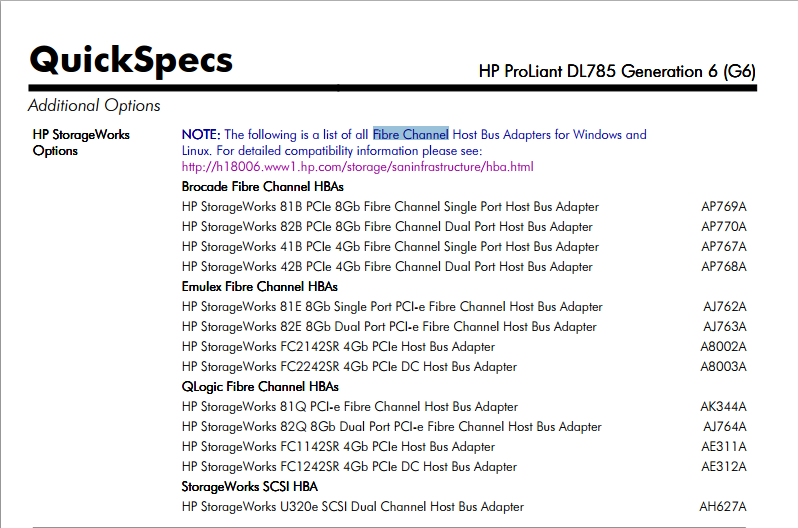
Alternatively, search for the server’s QuickSpecs. After opening the PDF, look for fibre channel. This PDF will list the HBA cards that Hewlett Packard Enterprise is selling to use with this server

fibrechannel

Choose your operating system and download the scexe file under the box Firmware – Storage Fibre Channel

Copy the file to the server and then run the file you just downloaded

root@linux:~ # ./CP022701.scexe