Author: Emerson .

AIX wall message: WARNING!!! The system is now operating with a power problem. This message will be walled every 12 hours. Remove this crontab entry after the problem is resolved

An AIX system displayed this message

Broadcast message from root@aix (tty) at 12:00:01 … rc.powerfail:2::WARNING!!! The system is now operating with a power problem. This message will be walled every 12 hours. Remove this crontab entry after the problem is resolved.

This message is called from cron at 12:00PM everyday

root@aix:/ # crontab -l
0 00,12 * * * wall%rc.powerfail:2::WARNING!!! The system is now operating with a power problem. This message will be walled every 12 hours. Remove this crontab entry after the problem is resolved.

I did this to check if there is still a problem

root@aix:/ # sh /etc/rc.powerfail > /dev/console 2>&1

Broadcast message from root@aix (pts/1) at 12:18:49 … rc.powerfail: init has received a SIGPWR signal. The system currently running under normal power conditions. Execute rc.powerfail -h as the root user for more information. ^G^G^G^G

According to the response shown above. My system is running under normal power conditions. Here is the help for the script

root@aix:/ # sh /etc/rc.powerfail -h
rc.powerfail:
This command is used to handle power problems with the system.
There are several different states that the system can be in when
the signal SIGPWR is received by init. The action taken will be
determined by the value of the power status. The following table
shows the values of the power status and action taken.
Power
Status Indication
—— —————————————————————-
0 System is running normally, there is no action taken.
1 A non-critical cooling problem exists.
2 A non-critical power problem exists.
3 System facing a critical condition. Will start shutdown in 10 minutes.
4 System facing a severe condition. Will be halted in the next 20 seconds.
255 ERROR with the machstat command, system shutdown starts immediately. ^G^G^G^G

Other codes

root@aix:/ # sh /etc/rc.powerfail > /dev/console 2>&1

Broadcast message from root@aix (pts/1) at 14:58:56 …

rc.powerfail: init has received a SIGPWR signal.
The system is now operating with a non-critical power problem.
Execute rc.powerfail -h as the root user for more information. ^G^G^G^G

Logrotate configuration for nscd

I wrote a section for nscd log rotation

Edited /etc/logrotate.conf file and added:

# system-specific logs may be also be configured here.
/var/log/nscd.log {
missingok
size 100M
create 644 root root
rotate 4
postrotate
/bin/kill -HUP `cat /var/run/nscd/nscd.pid 2> /dev/null` 2> /dev/null || true
endscript
}

I followed the HowTo: The Ultimate Logrotate Command Tutorial with 10 Examples

Tivoli Storage Manager – discover which is the server that is making the backups

To check the server that is making the backups, check which is the host that the client is establishing the connection. In this case is the host called TSMSERVER

root@linux:~ # dsmc q file
IBM Tivoli Storage Manager
Command Line Backup/Archive Client Interface
Client Version 5, Release 5, Level 3.0
Client date/time: 08/08/11 17:30:49
(c) Copyright by IBM Corporation and other(s) 1990, 2010. All Rights Reserved.

Node Name: LINUX
Session established with server TSMSERVER: AIX-RS/6000
Server Version 5, Release 4, Level 6.0
Server date/time: 08/08/11 17:30:37 Last access: 08/08/11 17:20:07

# Last Incr Date Type File Space Name
— ————– —- —————
1 03/01/11 03:05:21 REISERFS /
2 04/14/11 17:49:16 REISERFS /boot
3 03/03/11 15:08:10 EXT3 /logs
4 06/18/10 21:37:39 REISERFS /opt
5 06/18/10 22:17:30 REISERFS /usr
6 06/18/10 21:39:56 REISERFS /usr/software
7 06/18/10 21:38:53 REISERFS /var

Checking the hard drive model in an HP Smart Array

To discover the model of the hard drive that is in an HP Smart Array, type the following command

root@linux:~ # hpacucli ctrl all show config detail

Smart Array P400i in Slot 0 (Embedded)
Bus Interface: PCI
Slot: 0
Serial Number:
Cache Serial Number: PA82C0H9SV5DJS
RAID 6 (ADG) Status: Disabled
Controller Status: OK
Chassis Slot:
Hardware Revision: Rev D
Firmware Version: 7.22
Rebuild Priority: Medium
Expand Priority: Medium
Surface Scan Delay: 15 secs
Post Prompt Timeout: 0 secs
Cache Board Present: True
Cache Status: OK
Accelerator Ratio: 100% Read / 0% Write
Drive Write Cache: Disabled
Total Cache Size: 256 MB
No-Battery Write Cache: Disabled
Battery/Capacitor Count: 0
SATA NCQ Supported: True

Array: A
Interface Type: SAS
Unused Space: 0 MB
Status: Failed

Logical Drive: 1
Size: 136.7 GB
Fault Tolerance: RAID 1
Heads: 255
Sectors Per Track: 32
Cylinders: 35132
Stripe Size: 128 KB
Status: Interim Recovery Mode
Array Accelerator: Enabled
Unique Identifier: 600508B100184839535635444A530004
Disk Name: /dev/cciss/c0d0
Mount Points: /boot 1.0 GB
Logical Drive Label: A01123B864C1
Mirror Group 0:
physicaldrive 1I:1:1 (port 1I:box 1:bay 1, SAS, 146 GB, OK)
Mirror Group 1:
physicaldrive 1I:1:2 (port 1I:box 1:bay 2, SAS, 0 MB, Failed)

physicaldrive 1I:1:1
Port: 1I
Box: 1
Bay: 1
Status: OK
Drive Type: Data Drive
Interface Type: SAS
Size: 146 GB
Rotational Speed: 10000
Firmware Revision: HPDC
Serial Number: 3NM7VLAB00009915WTN0
Model: HP DG146BB976
PHY Count: 2
PHY Transfer Rate: 3.0GBPS, Unknown
physicaldrive 1I:1:2
Port: 1I
Box: 1
Bay: 2
Status: Failed
Drive Type: Data Drive
Interface Type: SAS
Size: 0 MB
Firmware Revision: HPDC
Serial Number: READ_CAPACITY FAILED
Model: HP DG146BB976
PHY Count: 1
PHY Transfer Rate: Unknown

This will be handy when you have to replace a faulty disk

root@linux:~ # hpacucli ctrl all show config

Smart Array P400i in Slot 0 (Embedded) (sn: )

array A (SAS, Unused Space: 0 MB)

logicaldrive 1 (136.7 GB, RAID 1, Interim Recovery Mode)

physicaldrive 1I:1:1 (port 1I:box 1:bay 1, SAS, 146 GB, OK)
physicaldrive 1I:1:2 (port 1I:box 1:bay 2, SAS, 0 MB, Failed)

This can be of interest – HP/Compaq Hard Disk Drives – Hard Drive Model Number Matrix
Getting IP address after installing CentOS / Red Hat Linux in a virtual machine

I installed a VirtualBox/Parallels Desktop virtual machine with CentOS 6 and it didn’t automatically set up the network card with DHCP. I needed to add the following configuration to the file

root@centos:/etc/sysconfig/network-scripts # vi ifcfg-eth0
DEVICE=”eth0″
HWADDR=”00:1C:42:C0:FF:EE”
NM_CONTROLLED=”yes”
ONBOOT=”yes
BOOTPROTO=”dhcp”

Then restart the network service

root@centos:/etc/sysconfig/network-scripts # service network restart
Shutting down interface eth0: [ OK ]
Shutting down loopback interface: [ OK ]
Bringing up loopback interface: [ OK ]
Bringing up interface eth0:
Determining IP information for eth0… done.
[ OK ]

Mac Compatibility for Ozone Onda 3HX

It is stated briefly on the manual that the Ozone Onda 3HX is compatible with the Mac. You just need to configure a few things in the System Preferences.

First, just connect the headset as if you were connecting the headset to the PC – Onda 3HX Quick Start Guide.

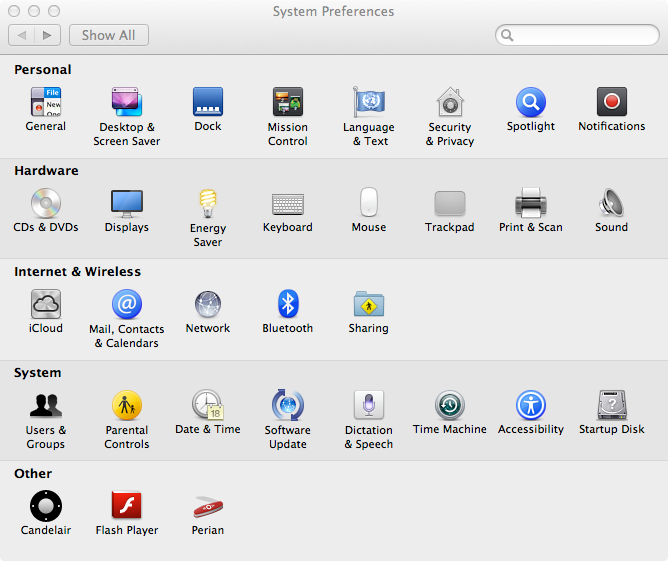
Open System Preferences and then on the hardware section choose Sound

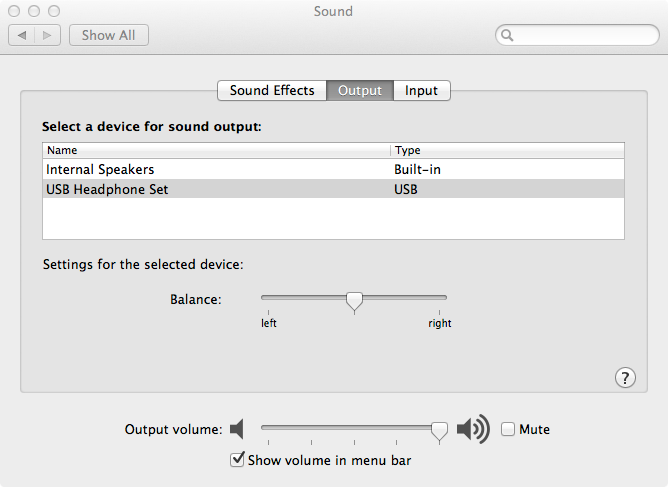
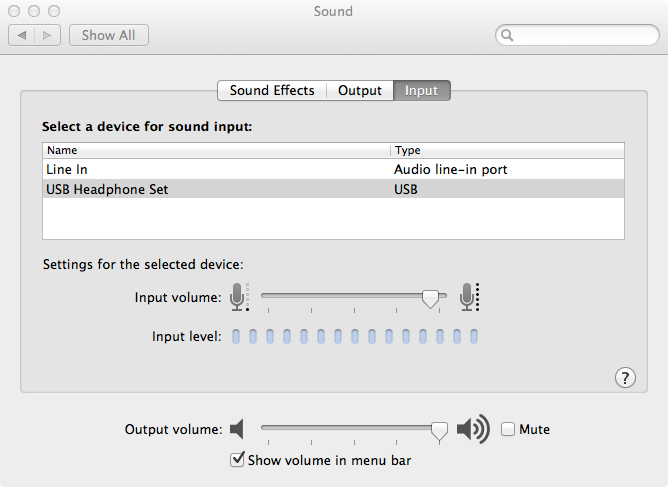
In the Ouput tab, choose the USB Headphone Set that is appearing

And you do the same thing on the Input tab

Done. Now you can hear and talk through the headset with your Mac.

HP OpenView Error: ovomanagementserver.hp.com: (bbc-289) status=eSSLError time= (above 10000 ms)

The HTTPS Operation Agent has been installed on a remote node and certificates correctly granted. Checking the connectivity with the bbcutil command for encrypted communication leads to the following error when executed on each side, agent or server:

root@linux:~ # /opt/OV/bin/bbcutil -ping ovomanagementserver.omc.hp.com

ovomanagementserver.hp.com: (bbc-289) status=eSSLError time=19609 ms

root@linux:~ # /opt/OV/bin/bbcutil -ping http://ovomanagementserver.hp.com

http://ovomanagementserver.hp.com: status=eServiceOK
coreID=52def78a-c60c-7546-0044-8256d848046c
bbcV=06.21.501 appN=ovbbccb appV=06.21.501
conn=1521 time=86 ms

Cause
As the non-encrypted communication does not fail, the problem should be tied only to the SSL chain. Looking at the output of the “bbcutil” command reveals that the time it takes trying to contact this node (19609 ms) is above the default timeout defined for the SSL Handshake process which is 10 seconds.

Fix
Increasing the SSL Handshake Timeout period to a higher value, clears the situation. Use the following command in both sides, server and agent, to increase the value to 5 minutes:

# ovconfchg -ns bbc.http -set SSL_HANDSHAKE_TIMEOUT 300000

Source: http://h30499.www3.hp.com/hpeb/attachments/hpeb/itrc-162/119064/1/356770.pdf

Ozone Onda 3HX Quick Start Guide

My old headset broke and while shopping I came across this one: Ozone Onda 3HX. It claims to be compatible with Xbox 360, PS3 and PC.

The company seems to be European and there is few reviews in English. I saw one from eTeknix and a few unboxing videos on Youtube and it seemed to be a well built headset.

I bought and liked.

If you saw 5.1 headsets and was wondering how to connect the headset to Xbox 360 and PS3, I scanned the quick start guide for you to take a look. No need to attach a Toslink cable to the soundcard. But you’ll need to use the composite cables with an adapter that comes with the headset and the Ozone Onda 3HX is not a 5.1 headset.

Check it out – Onda 3HX Quick Start Guide

rpm error: failed to stat /media: Input/output error

I had a system where the rpm command was very slow after I was trying to upgrade a package

root@rhel5:~ # rpm -Uvh /tmp/kexec-tools-1.102pre-154.el5.x86_64.rpm
error: failed to stat /media: Input/output error
Preparing… ########################################### [100%]
1:kexec-tools warning: /etc/kdump.conf created as /etc/kdump.conf.rpmnew
########################################### [100%]

The filesystem /media is a NFS share. The server that was hosting the NFS was down and the rpm command was slow because it tried to stat the filesystem.

OCFS2 Support for LVM/LVM2

Here is the official document about Oracle Linux Support for GFS, LVM and LVM2 (Doc ID 423207.1)

As of latest update of this document any combination of OCFS2 with LVM or LVM2 is not supported including clustered and single node configurations.