Year: 2014

SSH connection error – no supported authentication methods available (server sent keyboard-interactive)

Edit /etc/ssh/sshd_config and set the parameter PAMAuthenticationViaKBDInt to yes

# To disable tunneled clear text passwords, change PasswordAuthentication to no.
PasswordAuthentication yes

# Use PAM via keyboard interactive method for authentication.
# Depending on the setup of pam.conf(4) this may allow tunneled clear text
# passwords even when PasswordAuthentication is set to no. This is dependent
# on what the individual modules request and is out of the control of sshd
# or the protocol.
#PAMAuthenticationViaKBDInt no
PAMAuthenticationViaKBDInt yes

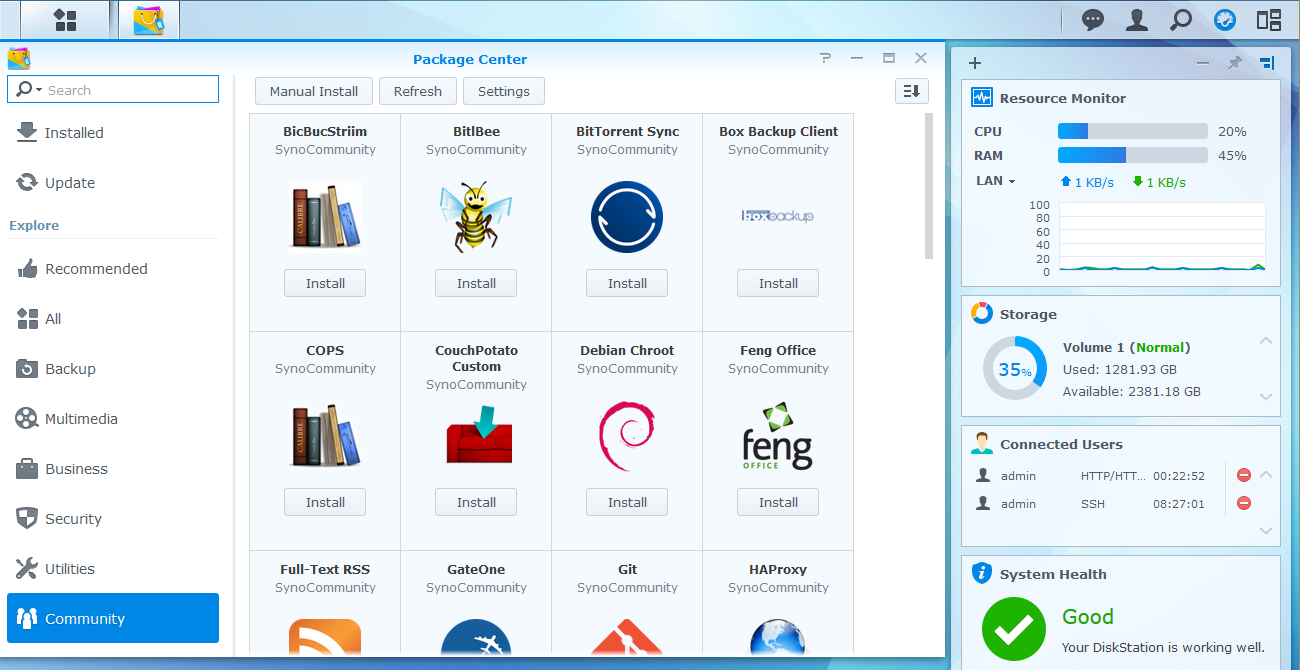
Adding packages from SynoCommunity repository for Synology NAS

You can add a new package source to add more programs to your Synology NAS. We will be adding the SynoCommunity software repository.

Open the Package Center and click on Settings
synocommunity_01
Under Package Sources add a new one called SynoCommunity with the location http://packages.synocommunity.com/. Press ok
synocommunity_02
At the end there is a new tab called Community that you can start adding new software
synocommunity_03
As of 2014/10/11 you can add the following software using the SynoCommunity repository

BicBucStriim – BicBucStriim streams books, digital books. It fills a gap in the functionality of current NAS devices, which provide access to your collection of music, videos and photos — but not books…
BitlBee – BitlBee brings IM (instant messaging) to IRC clients. It’s a great solution for people who have an IRC client running all the time and don’t want to run an additional MSN/AIM/whatever client.
BitTorrent Sync – Automatically sync files via secure, distributed technology.
Box Backup Client – Box Backup is an open source, completely automatic, on-line backup system. This is the client part of Box Backup.
COPS – Calibre OPDS and HTML PHP Server : light alternative to Calibre content server / Calibre2OPDS.
CouchPotato Custom – CouchPotato Custom allows you to run the fork of your choice of CouchPotato. You will be asked for the fork’s git URL during install.
Debian Chroot – Debian is a free operating system (OS) that comes with over 29000 packages, precompiled software bundled up in a nice format for easy installation on your DiskStation. Debian Chroot allows you…
Feng Office – Feng Office is a Collaboration Platform and Project Management System.
Full-Text RSS – Create full-text feed from feed or webpage URL.
GateOne – Gate One is an HTML5-powered terminal emulator and SSH client
Git – Git is a free and open source distributed version control system designed to handle everything from small to very large projects with speed and efficiency.
HAProxy – HAProxy is a free, very fast and reliable solution offering high availability, load balancing, and proxying for TCP and HTTP-based applications.
Headphones – Headphones is an automatic NZB and torrent downloader for music. Mark albums as wanted and have them downloaded as soon as they are available. Different quality settings are…
HTPC-Manager – Contol your Htpc with ease. Using multiple applications to control you htpc? No More! Htpc Manager combines all your software and provides an easy way to controll them all!
Maraschino – Maraschino is a simple web interface that acts as a nice overview/front page for your XBMC HTPC. It has many modules: Media library browser, SABnzbd+, SickBeard, XBMC controller, Diskspace…
MantisBT – Mantis is an easily deployable, web based bugtracker to aid product bug tracking. It requires PHP, MySQL and a web server. It is simpler than Bugzilla and easily editable.
Midnight Commander – Midnight Commander is a console application with a text user interface. The main interface consists of two panels which display the file system.
Memcached – Free & open source, high-performance, distributed memory object caching system, generic in nature, but intended for use in speeding up dynamic web applications by alleviating database…
Mylar – Mylar is an automatic Comic Book downloader (cbr/cbz)
Node.js – Node.js is a platform built on Chrome’s JavaScript runtime for easily building fast, scalable network applications.
NZBGet – NZBGet is a command-line based binary newsgrabber for nzb files, written in C++. It supports client/server mode, automatic par-check/-repair, unpack and web-interface. NZBGet requires low system…
ownCloud – ownCloud is a personal cloud which runs on your own server and gives you freedom and control over your own data.
Python – Python Programming Language.
Python3 – Python Programming Language.
Redis – Redis is an open source, advanced key-value store. It is often referred to as a data structure server since keys can contain strings, hashes, lists, sets and sorted sets.
Roundcube Webmail – Roundcube is a free and open source webmail solution with a desktop-like user interface which is easy to install/configure and that runs on a standard LAMPP server. It is the same software Synology…
SABnzbd – SABnzbd makes Usenet as simple and streamlined as possible by automating everything we can. All you have to do is add an .nzb. SABnzbd takes over from there, where it will be automatically…
Selfoss – The new multipurpose rss reader, live stream, mashup, aggregation web application.
SickBeard Custom – SickBeard Custom allows you to run the fork of your choice of SickBeard. You will be asked for the fork’s git URL during install.
SickBeard – SickBeard is a PVR for newsgroup users (with limited torrent support). It watches for new episodes of your favorite shows and when they are posted it downloads them, sorts and renames them…
Subliminal – Subliminal allows you automatically download best-matching subtitles for your movies and tv shows on your DiskStation. This package is named after Subliminal, the Python library used to search and…
Tiny Tiny RSS – Tiny Tiny RSS is an open source web-based news feed (RSS/Atom) reader and aggregator, designed to allow you to read news from any location, while feeling as close to a real desktop application as…
Transmission – Transmission is an easy and fast BitTorrent client. You can control it remotely with its web interface or dedicated applications.
Tvheadend – Tvheadend is a TV streaming server for Linux supporting DVB-S, DVB-S2, DVB-C, DVB-T, ATSC, IPTV and Analog video (V4L) as input sources. It also comes with a powerful and easy to use web…
uMurmur – uMurmur is a minimalistic VoIP server based on the open source software Mumble. It allows simultaneous communications between multiple users. Its low latency makes it especially…
ZNC – Advanced IRC bouncer. An IRC bouncer is nothing more than an IRC proxy. ZNC will always be connected in your chat rooms, and will be the gateway between your clients, and your IRC servers. You…

wget running in a Synology NAS not downloading. Error message: HTTPS support not compiled in.

After you installed ipkg maybe you found that wget is not downloading files through https

DiskStation> wget http://dl.dropbox.com/u/3001640/webman.pyload.tar.gz
–2014-10-11 14:26:09– http://dl.dropbox.com/u/3001640/webman.pyload.tar.gz
Resolving dl.dropbox.com… 50.17.213.189
Connecting to dl.dropbox.com|50.17.213.189|:80… connected.
HTTP request sent, awaiting response… 302 FOUND
Location: http://dl.dropboxusercontent.com/u/3001640/webman.pyload.tar.gz [following]
–2014-10-11 14:26:09– http://dl.dropboxusercontent.com/u/3001640/webman.pyload.tar.gz
Resolving dl.dropboxusercontent.com… 23.23.237.190, 23.23.121.189, 54.243.96.35, …
Connecting to dl.dropboxusercontent.com|23.23.237.190|:80… connected.
HTTP request sent, awaiting response… 302 FOUND
Cookie coming from dropbox.com attempted to set domain to dropbox.com
Location: https://dl.dropboxusercontent.com/u/3001640/webman.pyload.tar.gz [following]
https://dl.dropboxusercontent.com/u/3001640/webman.pyload.tar.gz: HTTPS support not compiled in.

To solve this problem, install the package wget-ssl. This version has support for HTTPS

DiskStation> ipkg install wget-ssl
Installing wget-ssl (1.12-2) to root…
Nothing to be done
An error ocurred, return value: 1.
Collected errors:
ERROR: The following packages conflict with wget-ssl:
wget

If you still have the wget version installed from Optware, first remove it

DiskStation> ipkg remove wget
Removing package wget from root…
Successfully terminated.

Then try to install again

DiskStation> ipkg install wget-ssl
Installing wget-ssl (1.12-2) to root…
Downloading http://ipkg.nslu2-linux.org/feeds/optware/cs08q1armel/cross/unstable/wget-ssl_1.12-2_arm.ipk
Installing libidn (1.25-1) to root…
Downloading http://ipkg.nslu2-linux.org/feeds/optware/cs08q1armel/cross/unstable/libidn_1.25-1_arm.ipk
Configuring libidn
Configuring wget-ssl
Successfully terminated.

HP BladeSystem Onboard Administrator – How to Make “SHOW ALL” Inventory Report

Logon to the HP Onboard Administrator GUI and then after the IP address of the Onboard Administrator add /cgi-bin/showAll. E.g. https://192.168.x.x/cgi-bin/showAll

More examples can be found in this document:
HP BladeSystem Onboard Administrator – How to take “SHOW ALL” Inventory Report

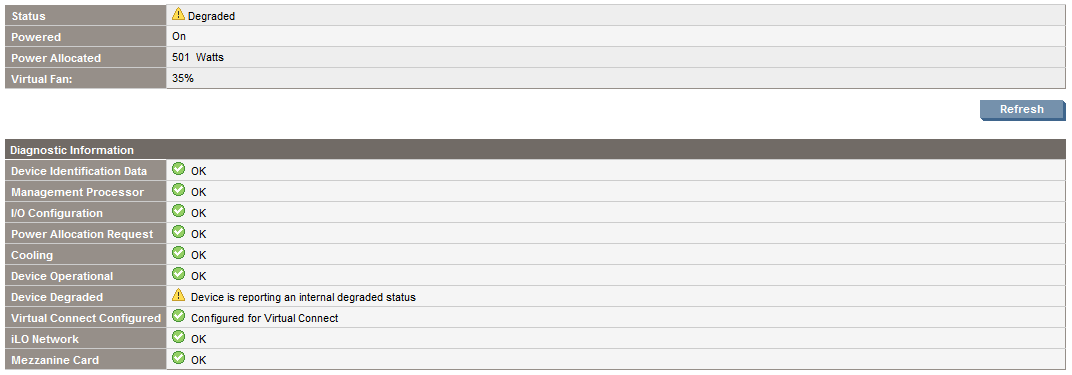
HP Proliant: Device is reporting an internal degraded status

When you see an exclamation mark next to the blade server, verify the server hardware
DeviceBays
First click on the server device bay and check its status
Degraded
If it shows Device is reporting an internal degraded status, first upgrade the iLO firmware. Then verify if it was solved.

If not, verify if there is a faulty disk in the disk array with hpacucli ctrl all show config

root@linux:~ # hpacucli ctrl all show config

Smart Array P400i in Slot 0 (Embedded) (sn: )

array A (SAS, Unused Space: 0 MB)

logicaldrive 1 (136.7 GB, RAID 1, OK)

physicaldrive 1I:1:1 (port 1I:box 1:bay 1, SAS, 146 GB, OK)
physicaldrive 1I:1:2 (port 1I:box 1:bay 2, SAS, 146 GB, OK)

Install hpasmcli. Part of HP System Health Application and Command Line Utilities (hp-health)

root@linux:/tmp # rpm -ivh hp-health-9.40-1602.37.sles10.x86_64.rpm
Preparing… ########################################### [100%]
1:hp-health ########################################### [100%]
Please read the Licence Agreement for this software at

/opt/hp/hp-health/hp-health.license

By not removing this package, you are accepting the terms
of the “HP Proliant Essentials Software End User License Agreement”.
Using Proliant Standard
IPMI based System Health Monitor
Using standard Linux IPMI device driver
Starting ipmi drivers: done
Starting Proliant Standard
IPMI based System Health Monitor (hpasmlited):
done

Starting HP Advanced Server Recovery Daemon done
The hp-health RPM has installed successfully.

Start hpasmcli

root@linux:~ # hpasmcli
HP management CLI for Linux (v2.0)
Copyright 2008 Hewlett-Packard Development Group, L.P.

————————————————————————–
NOTE: Some hpasmcli commands may not be supported on all Proliant servers.
Type ‘help’ to get a list of all top level commands.
————————————————————————–

Another component that usually gives problem is a Memory DIMM.

hpasmcli> show dimm
DIMM Configuration
——————
Cartridge #: 0
Module #: 1
Present: Yes
Form Factor: fh
Memory Type: OTHER(14h)
Size: 4096 MB
Speed: 667 MHz
Supports Lock Step: No
Configured for Lock Step: No
Status: Ok

Cartridge #: 0
Module #: 2
Present: Yes
Form Factor: fh
Memory Type: OTHER(14h)
Size: 4096 MB
Speed: 667 MHz
Supports Lock Step: No
Configured for Lock Step: No
Status: Ok

Cartridge #: 0
Module #: 3
Present: Yes
Form Factor: fh
Memory Type: OTHER(14h)
Size: 4096 MB
Speed: 667 MHz
Supports Lock Step: No
Configured for Lock Step: No
Status: Ok

Cartridge #: 0
Module #: 4
Present: Yes
Form Factor: fh
Memory Type: OTHER(14h)
Size: 4096 MB
Speed: 667 MHz
Supports Lock Step: No
Configured for Lock Step: No
Status: Ok

Cartridge #: 0
Module #: 5
Present: Yes
Form Factor: fh
Memory Type: OTHER(14h)
Size: 4096 MB
Speed: 667 MHz
Supports Lock Step: No
Configured for Lock Step: No
Status: Ok

Cartridge #: 0
Module #: 6
Present: Yes
Form Factor: fh
Memory Type: OTHER(14h)
Size: 4096 MB
Speed: 667 MHz
Supports Lock Step: No
Configured for Lock Step: No
Status: DIMM is degraded

Cartridge #: 0
Module #: 7
Present: Yes
Form Factor: fh
Memory Type: OTHER(14h)
Size: 4096 MB
Speed: 667 MHz
Supports Lock Step: No
Configured for Lock Step: No
Status: Ok

Cartridge #: 0
Module #: 8
Present: Yes
Form Factor: fh
Memory Type: OTHER(14h)
Size: 4096 MB
Speed: 667 MHz
Supports Lock Step: No
Configured for Lock Step: No
Status: Ok

Cartridge #: 0
Module #: 9
Present: Yes
Form Factor: fh
Memory Type: OTHER(14h)
Size: 4096 MB
Speed: 667 MHz
Supports Lock Step: No
Configured for Lock Step: No
Status: Ok

Cartridge #: 0
Module #: 10
Present: Yes
Form Factor: fh
Memory Type: OTHER(14h)
Size: 4096 MB
Speed: 667 MHz
Supports Lock Step: No
Configured for Lock Step: No
Status: Ok

Cartridge #: 0
Module #: 11
Present: Yes
Form Factor: fh
Memory Type: OTHER(14h)
Size: 4096 MB
Speed: 667 MHz
Supports Lock Step: No
Configured for Lock Step: No
Status: Ok

Cartridge #: 0
Module #: 12
Present: Yes
Form Factor: fh
Memory Type: OTHER(14h)
Size: 4096 MB
Speed: 667 MHz
Supports Lock Step: No
Configured for Lock Step: No
Status: Ok

Cartridge #: 0
Module #: 13
Present: Yes
Form Factor: fh
Memory Type: OTHER(14h)
Size: 4096 MB
Speed: 667 MHz
Supports Lock Step: No
Configured for Lock Step: No
Status: Ok

Cartridge #: 0
Module #: 14
Present: Yes
Form Factor: fh
Memory Type: OTHER(14h)
Size: 4096 MB
Speed: 667 MHz
Supports Lock Step: No
Configured for Lock Step: No
Status: Ok

Cartridge #: 0
Module #: 15
Present: Yes
Form Factor: fh
Memory Type: OTHER(14h)
Size: 4096 MB
Speed: 667 MHz
Supports Lock Step: No
Configured for Lock Step: No
Status: Ok

Cartridge #: 0
Module #: 16
Present: Yes
Form Factor: fh
Memory Type: OTHER(14h)
Size: 4096 MB
Speed: 667 MHz
Supports Lock Step: No
Configured for Lock Step: No
Status: Ok

hpasmcli>

After this, you’ll have to run diagnostics using HP Insight Online Diagnostics that you installed on the operating system or boot with the CD/DVD to run the HP Insight Offline Diagnostics

Linux – route add error: SIOCADDRT: No such process

I was being shown this message but I knew the operating system was refusing to add the route

root@linux:~ # route add -net 172.22.1.0 gw 172.22.18.1 netmask 255.255.255.0 dev eth1
SIOCADDRT: No such process

I added the route to /etc/sysconfig/network/routes and then restarted the network service

192.168.1.1 192.168.233.2 255.255.255.255 eth1
148.91.0.0 172.22.18.1 255.255.0.0 eth1
207.169.17.0 172.22.18.1 255.255.255.0 eth1
172.22.0.0 172.22.18.1 255.255.255.0 eth1
172.22.14.0 172.22.18.1 255.255.255.0 eth1
172.22.1.0 172.22.18.1 255.255.255.0 eth1
default 172.22.240.1 – –

Setting up a SVM soft partition in a mirror

This is the mirror we will be using

root@solaris:/ # metastat d80
d80: Mirror
Submirror 0: d82
State: Okay
Submirror 1: d81
State: Okay
Pass: 1
Read option: roundrobin (default)
Write option: parallel (default)
Size: 96081792 blocks (45 GB)

d82: Submirror of d80
State: Okay
Size: 96081792 blocks (45 GB)
Stripe 0:
Device Start Block Dbase State Reloc Hot Spare
c1t8d0s4 0 No Okay Yes

d81: Submirror of d80
State: Okay
Size: 96081792 blocks (45 GB)
Stripe 0:
Device Start Block Dbase State Reloc Hot Spare
c0t10d0s4 0 No Okay Yes

Device Relocation Information:
Device Reloc Device ID
c1t8d0 Yes id1,sd@TSEAGATE_ST314670LSUN146G3KS2ZHD2
c0t10d0 Yes id1,sd@TSEAGATE_ST314670LSUN146G3KS2RP29

Creating a soft partition and instead of indicating a partition, declare the mirror

root@solaris:/ # metainit d83 -p d80 2g
d83: Soft Partition is setup

Create the filesystem

root@solaris:/ # newfs /dev/md/rdsk/d83
newfs: construct a new file system /dev/md/rdsk/d83: (y/n)? y
Warning: 18560 sector(s) in last cylinder unallocated
/dev/md/rdsk/d83: 4194304 sectors in 207 cylinders of 24 tracks, 848 sectors
2048.0MB in 42 cyl groups (5 c/g, 49.69MB/g, 12032 i/g)
super-block backups (for fsck -F ufs -o b=#) at:
32, 102640, 205248, 307856, 410464, 513072, 615680, 718288, 820896, 923504,
3256352, 3358960, 3461568, 3564176, 3666784, 3769392, 3872000, 3974608,
4077216, 4179824

Check status

root@solaris:/ # metastat -c
d83 p 2.0GB d80
d80 m 45GB d82 d81
d82 s 45GB c1t8d0s4
d81 s 45GB c0t10d0s4
d50 m 516MB d52 d51
d52 s 516MB c1t8d0s7
d51 s 516MB c0t10d0s7
d40 m 19GB d42 d41
d42 s 19GB c1t8d0s6
d41 s 19GB c0t10d0s6
d30 m 19GB d32 d31
d32 s 19GB c1t8d0s5
d31 s 19GB c0t10d0s5
d20 m 31GB d22 d21
d22 s 31GB c1t8d0s1
d21 s 31GB c0t10d0s1
d10 m 19GB d12 d11
d12 s 19GB c1t8d0s0
d11 s 19GB c0t10d0s0

Configure HP Remote Insight Lights-Out Edition II Board (RILOE II) – ILO 1

In an HP Proliant DL380 G3 I had an older iLO.
riloeII

This version is also called Remote Insight Lights-Out Edition II Board (RILOE II)
User guide for HP Remote Insight Lights-Out Edition II Board

The ROM-based setup utility F8 (RBSU F8) allows you to configure RILOE II during server boot-up. RBSU F8 is useful for configuring servers that do not use DNS/DHCP. RBSU F8 is available every time the server is booted. RBSU F8 cannot run remotely.

06

Turn on disk UID on an HP Smart Array Controller

I have an HP ProLiant DL580 G3 and a disk had to be replaced.

It was identified the disk to be replaced was the Physicaldrive 2:2

root@linux:~ # hpacucli ctrl all show config

Smart Array 642 in Slot 3 (sn: P92260PXQS4036)

array A (Parallel SCSI, Unused Space: 0 MB)

logicaldrive 1 (273.5 GB, RAID 5, OK)

physicaldrive 2:0 (port 2:id 0 , Parallel SCSI, 146.8 GB, OK)
physicaldrive 2:1 (port 2:id 1 , Parallel SCSI, 146.8 GB, OK)
physicaldrive 2:2 (port 2:id 2 , Parallel SCSI, 146.8 GB, OK)

To turn on the disk UID, identify the controller and physical drive location

root@linux:~ # hpacucli ctrl slot=3 pd 2:2 modify led=on

To turn off the disk UID, identify the controller and physical drive location

root@linux:~ # hpacucli ctrl slot=3 pd 2:2 modify led=off

Firefox Error code: sec_error_ca_cert_invalid

I was receiving this error when trying to open an iLO 3 connection through Onboard Administrator.
sec_error_ca_cert_invalid

To solve this problem, type about:config in the address bar.

Then toggle to false the preference security.use_mozillapkix_verification