Create a new virtual machine. I’m calling mine CentOS 6 Base

Set how much memory you would like. I’m setting mine with 1GB of RAM

Creating a new hard drive
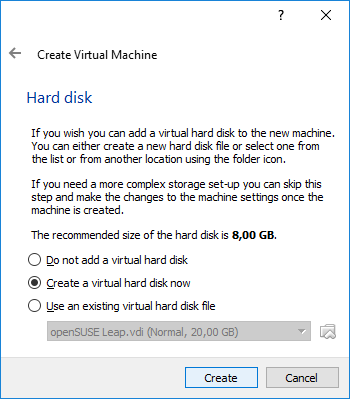
Choose VDI (VirtualBox Disk Image)

Dynamically allocated

CentOS 6 Base is the name and I set to 20GB

Checking Virtual Machine Properties. Network section, Adapter 1 set to NAT

Adapter 2 set to Host-only adapter

If you are behind a corporate proxy, go to File, Preferences, and set Proxy to your proxy and port

Continue to Installing Linux on Oracle Virtualbox – CentOS 6
Author: Emerson .
Shrinking ext4 filesystem
I’m creating a new volume group with 3 10GB disks
root@linux:~ # pvcreate /dev/sdc
Physical volume “/dev/sdc” successfully created
root@linux:~ # pvcreate /dev/sdd
Physical volume “/dev/sdd” successfully created
root@linux:~ # pvcreate /dev/sde
Physical volume “/dev/sde” successfully createdroot@linux:~ # vgcreate appvg /dev/sdc /dev/sdd /dev/sde
Volume group “appvg” successfully createdroot@linux:~ # vgs appvg
VG #PV #LV #SN Attr VSize VFree
appvg 3 0 0 wz–n- 29.99g 29.99g
Creating a new 25GB logical volume
root@linux:~ # lvcreate -L 25g -n applv appvg
Logical volume “applv” created.
Creating a filesystem
root@linux:~ # mkfs -t ext4 /dev/appvg/applv
mke2fs 1.41.12 (17-May-2010)
Filesystem label=
OS type: Linux
Block size=4096 (log=2)
Fragment size=4096 (log=2)
Stride=0 blocks, Stripe width=0 blocks
1638400 inodes, 6553600 blocks
327680 blocks (5.00%) reserved for the super user
First data block=0
Maximum filesystem blocks=4294967296
200 block groups
32768 blocks per group, 32768 fragments per group
8192 inodes per group
Superblock backups stored on blocks:
32768, 98304, 163840, 229376, 294912, 819200, 884736, 1605632, 2654208,
4096000Writing inode tables: done
Creating journal (32768 blocks): done
Writing superblocks and filesystem accounting information: doneThis filesystem will be automatically checked every 37 mounts or
180 days, whichever comes first. Use tune2fs -c or -i to override.
Mounting the filesystem
root@linux:~ # mkdir /app
root@linux:~ # mount /dev/appvg/applv /app
root@linux:~ # df -hP /app
Filesystem Size Used Avail Use% Mounted on
/dev/mapper/appvg-applv 25G 44M 24G 1% /app
I will remove the disk /dev/sde from the volume group. 25GB logical volume will shrink to 20GB.
Checking which disks the logical volume is using
root@linux:~ # lvdisplay -m /dev/mapper/appvg-applv
— Logical volume —
LV Path /dev/appvg/applv
LV Name applv
VG Name appvg
LV UUID 9tofzm-1zBU-DfbM-nmws-lqj7-QULb-U4Reqh
LV Write Access read/write
LV Creation host, time centos6.setaoffice.com, 2017-06-29 16:53:18 -0300
LV Status available
# open 1
LV Size 25.00 GiB
Current LE 6400
Segments 3
Allocation inherit
Read ahead sectors auto
– currently set to 256
Block device 253:6— Segments —
Logical extents 0 to 2558:
Type linear
Physical volume /dev/sdc
Physical extents 0 to 2558Logical extents 2559 to 5117:
Type linear
Physical volume /dev/sdd
Physical extents 0 to 2558Logical extents 5118 to 6399:
Type linear
Physical volume /dev/sde
Physical extents 0 to 1281
Checking Total PE to calculate logical volume
root@linux:~ # pvdisplay /dev/sdc
— Physical volume —
PV Name /dev/sdc
VG Name appvg
PV Size 10.00 GiB / not usable 4.00 MiB
Allocatable yes (but full)
PE Size 4.00 MiB
Total PE 2559
Free PE 0
Allocated PE 2559
PV UUID ZnR27c-LPaE-0ZQa-t0Hc-yWLf-v06d-et7fb5root@linux:~ # pvdisplay /dev/sdd
— Physical volume —
PV Name /dev/sdd
VG Name appvg
PV Size 10.00 GiB / not usable 4.00 MiB
Allocatable yes (but full)
PE Size 4.00 MiB
Total PE 2559
Free PE 0
Allocated PE 2559
PV UUID OZY6w8-fUq6-wbPE-ILcr-LwOP-AeaS-j2qd9E
Resizing logical volume
root@linux:~ # lvresize -l 5118 -r /dev/appvg/applv
fsck from util-linux-ng 2.17.2
/dev/mapper/appvg-applv: 11/1638400 files (0.0% non-contiguous), 146849/6553600 blocks
resize2fs 1.41.12 (17-May-2010)
Resizing the filesystem on /dev/mapper/appvg-applv to 5240832 (4k) blocks.
The filesystem on /dev/mapper/appvg-applv is now 5240832 blocks long.Size of logical volume appvg/applv changed from 25.00 GiB (6400 extents) to 19.99 GiB (5118 extents).
Logical volume applv successfully resized.
Checking which disks the logical volume is using
root@linux:~ # lvdisplay -m /dev/mapper/appvg-applv
— Logical volume —
LV Path /dev/appvg/applv
LV Name applv
VG Name appvg
LV UUID 9tofzm-1zBU-DfbM-nmws-lqj7-QULb-U4Reqh
LV Write Access read/write
LV Creation host, time centos6.setaoffice.com, 2017-06-29 16:53:18 -0300
LV Status available
# open 0
LV Size 19.99 GiB
Current LE 5118
Segments 2
Allocation inherit
Read ahead sectors auto
– currently set to 256
Block device 253:6— Segments —
Logical extents 0 to 2558:
Type linear
Physical volume /dev/sdc
Physical extents 0 to 2558Logical extents 2559 to 5117:
Type linear
Physical volume /dev/sdd
Physical extents 0 to 2558
Removing disk from volume group and label from physical volume
root@linux:~ # vgreduce appvg /dev/sde
Removed “/dev/sde” from volume group “appvg”root@linux:~ # pvremove /dev/sde
Labels on physical volume “/dev/sde” successfully wiped
Checking serial number of Oracle SPARC T5-8
Connect to ILOM
emerson@linux:~ $ ssh root@172.23.99.70
Password:Oracle(R) Integrated Lights Out Manager
Version 3.2.5.6.b r103360
Copyright (c) 2015, Oracle and/or its affiliates. All rights reserved.
Warning: HTTPS certificate is set to factory default.
Hostname: ssccn1-sp
-> show /System
/System
Targets:
Open_Problems (1)
CPU_Modules
Processors
Memory
Power
Cooling
Storage
Networking
PCI_Devices
Firmware
LogProperties:
health = Service Required
health_details = PM0 (Processor Module 0) is faulty. Type ‘show /System/Open_Problems’ for details.
open_problems_count = 1
type = Rack Mount
model = SuperCluster T5-8
qpart_id = Q9527
part_number = SuperCluster T5-8
serial_number = AK00300268
component_model = SPARC T5-8
component_part_number = 7087535
component_serial_number = SP00386386
system_identifier = Oracle SuperCluster T5-8 SP00386386
system_fw_version = Sun System Firmware 9.5.1.b 2015/10/01 16:33
primary_operating_system = Oracle Solaris 11.3 SPARC
primary_operating_system_detail = –
host_primary_mac_address = 00:10:e0:76:92:de
ilom_address = 172.23.99.70
ilom_mac_address = 00:10:E0:76:92:E7
locator_indicator = Off
power_state = On
actual_power_consumption = 3958 watts
action = (none)Commands:
cd
reset
set
show
start
stop
Another way is to locate the manufacturing sticker on the front of the server or on the sticker on the side of the server
Red Hat Linux guest on VMware: Bringing up interface eth0: vmxnet3 device eth0 does not seem to be present, delaying initialization
I had a problem where I after a Red Hat Linux guest running on VMware was showing the following message on start up
Bringing up interface eth0: vmxnet3 device eth0 does not seem to be present, delaying initialization
To solve this problem, remove VMware Tools and reinstall it
UXMON: slave eno49 of bonding device bond0 in Red Hat Enterprise Linux 7
ATTENTION, RMC LEVEL 1 AGENT: This ticket will be automatically worked by the Automation Bus. Pls. ensure your Ticket List/View includes the “Assignee” column, monitor this ticket until the user “ABOPERATOR” is no longer assigned, BEFORE you start work on this ticket.
Node : linux.setaoffice.com
Node Type : Intel/AMD x64(HTTPS)
Severity : major
OM Server Time: 2017-03-07 09:50:03
Message : UXMON: slave eno49 of bonding device bond0
Msg Group : OS
Application : bondmon
Object : bond
Event Type :
not_foundInstance Name :
not_foundInstruction : The ‘cat /sys/class/net/bondX/slave_ethY/operstate’ command shows detail
Please check /var/opt/OV/log/OpC/bond_mon.log for more details
Running UXMONbroker we see that there are some files that don’t exist
root@linux:~ # /var/opt/OV/bin/instrumentation/UXMONbroker -check bondmon
Mon Mar 13 15:47:35 2017 : INFO : UXMONbondmon is running now, pid=17458
cat: /sys/class/net/bond0/slave_eno49/operstate: No such file or directory
Mon Mar 13 15:47:35 2017 : Major: slave eno49 of bonding device bond0
cat: /sys/class/net/bond0/slave_eno50/operstate: No such file or directory
Mon Mar 13 15:47:35 2017 : Major: slave eno50 of bonding device bond0
mv: ‘/dev/null’ and ‘/dev/null’ are the same file
Mon Mar 13 15:47:35 2017 : INFO : UXMONbondmon end, pid=17458root@linux:~ # ls -l /sys/class/net/bond0/
total 0
-r–r–r– 1 root root 4096 Mar 2 13:35 addr_assign_type
-r–r–r– 1 root root 4096 Mar 7 17:38 address
-r–r–r– 1 root root 4096 Mar 7 17:38 addr_len
drwxr-xr-x 2 root root 0 Mar 2 13:35 bonding
-r–r–r– 1 root root 4096 Mar 7 17:38 broadcast
-rw-r–r– 1 root root 4096 Mar 7 17:38 carrier
-r–r–r– 1 root root 4096 Mar 7 17:38 carrier_changes
-r–r–r– 1 root root 4096 Mar 2 13:35 dev_id
-r–r–r– 1 root root 4096 Mar 7 17:38 dev_port
-r–r–r– 1 root root 4096 Mar 7 17:38 dormant
-r–r–r– 1 root root 4096 Mar 7 17:38 duplex
-rw-r–r– 1 root root 4096 Mar 7 17:38 flags
-rw-r–r– 1 root root 4096 Mar 7 17:38 gro_flush_timeout
-rw-r–r– 1 root root 4096 Mar 7 17:38 ifalias
-r–r–r– 1 root root 4096 Mar 2 13:35 ifindex
-r–r–r– 1 root root 4096 Mar 2 13:35 iflink
-r–r–r– 1 root root 4096 Mar 7 17:38 link_mode
lrwxrwxrwx 1 root root 0 Mar 7 17:38 lower_eno49 -> ../../../pci0000:00/0000:00:02.0/0000:06:00.0/net/eno49
lrwxrwxrwx 1 root root 0 Mar 7 17:38 lower_eno50 -> ../../../pci0000:00/0000:00:02.0/0000:06:00.1/net/eno50
-rw-r–r– 1 root root 4096 Mar 7 17:38 mtu
-rw-r–r– 1 root root 4096 Mar 7 17:38 netdev_group
-r–r–r– 1 root root 4096 Mar 7 17:38 operstate
-r–r–r– 1 root root 4096 Mar 2 13:35 phys_port_id
drwxr-xr-x 2 root root 0 Mar 2 13:41 power
drwxr-xr-x 34 root root 0 Mar 2 13:35 queues
-r–r–r– 1 root root 4096 Mar 7 17:38 speed
drwxr-xr-x 2 root root 0 Mar 2 13:41 statistics
lrwxrwxrwx 1 root root 0 Mar 2 13:35 subsystem -> ../../../../class/net
-rw-r–r– 1 root root 4096 Mar 7 17:38 tx_queue_len
-r–r–r– 1 root root 4096 Mar 2 13:35 type
-rw-r–r– 1 root root 4096 Mar 2 13:35 uevent
This is a Red Hat Enterprise Linux 7. Current HPOM have a bug that is querying the wrong file
root@linux:~ # cat /etc/*release
NAME=”Red Hat Enterprise Linux Server”
VERSION=”7.3 (Maipo)”
ID=”rhel”
ID_LIKE=”fedora”
VERSION_ID=”7.3″
PRETTY_NAME=”Red Hat Enterprise Linux”
ANSI_COLOR=”0;31″
CPE_NAME=”cpe:/o:redhat:enterprise_linux:7.3:GA:server”
HOME_URL=”https://www.redhat.com/”
BUG_REPORT_URL=”https://bugzilla.redhat.com/”REDHAT_BUGZILLA_PRODUCT=”Red Hat Enterprise Linux 7″
REDHAT_BUGZILLA_PRODUCT_VERSION=7.3
REDHAT_SUPPORT_PRODUCT=”Red Hat Enterprise Linux”
REDHAT_SUPPORT_PRODUCT_VERSION=”7.3″
Red Hat Enterprise Linux Server release 7.3 (Maipo)
Red Hat Enterprise Linux Server release 7.3 (Maipo)
Copy the bond_mon.cfg configuration file and disable this module
cp -p /var/opt/OV/bin/instrumentation/bond_mon.cfg /var/opt/OV/conf/OpC
vi /var/opt/OV/conf/OpC/bond_mon.cfg
disable = yesroot@linux:~ # /var/opt/OV/bin/instrumentation/UXMONbroker -check bondmon
root@linux:~ #
Solaris 9 Branded Zone was not starting ftp when running kill -HUP
I have a Solaris 9 Branded Zone
root@solaris9:/ # uname -a
SunOS solaris9 5.9 Generic_Virtual sun4v sparc sun4v
Configured to run FTP
root@solaris9:/ # grep ftp /etc/inetd.conf
# ftp telnet shell login exec tftp finger printer
# TFTPD – tftp server (primarily used for booting)
#tftp dgram udp6 wait root /usr/sbin/in.tftpd in.tftpd -s /tftpboot
ftp stream tcp6 nowait root /usr/sbin/in.ftpd in.ftpd -l
But it was not working
root@solaris9:/ # ps -ef | grep ftp
root 10137 13230 0 13:31:28 pts/4 0:00 grep ftproot@solaris9:/ # ps -ef | grep inet
root 12579 13230 0 13:31:34 pts/4 0:00 grep inet
root 1325 12833 0 Mar 12 ? 0:00 /usr/sbin/inetd -s start
Tried to kill -HUP but still not working
root@solaris9:/ # kill -HUP 1325
root@solaris9:/ # netstat -an | grep 21 | grep LISTEN
142.40.236.158.1521 *.* 0 0 1048576 0 LISTEN
142.40.236.10.1521 *.* 0 0 1048576 0 LISTEN
Stopped and started inetsvc
root@solaris9:/ # /etc/init.d/inetsvc stop
root@solaris9:/ # /etc/init.d/inetsvc startroot@solaris9:/ # ps -ef | grep inet
root 12098 12833 0 13:49:02 ? 0:00 /usr/sbin/inetd -s
root 15358 3734 0 13:49:05 pts/4 0:00 grep inet
FTP working again
root@solaris9:/ # netstat -an | grep 21 | grep LISTEN
142.40.236.158.1521 *.* 0 0 1048576 0 LISTEN
142.40.236.10.1521 *.* 0 0 1048576 0 LISTEN
*.21 *.* 0 0 1048576 0 LISTEN
*.21 *.* 0 0 1048576 0 LISTEN
One path missing in disk map on multipath device
Showing a particular case:
The disk mpath5 was only showing one path
root@linux:~ # multipath -ll mpath5
mpath5 (350002ac19430374a) dm-17 3PARdata,VV
[size=47G][features=0][hwhandler=0][rw]
\_ round-robin 0 [prio=1][active]
\_ 2:0:0:1 sdh 8:112 [active][ready]
The disk used by operating system is cciss/c0d0
root@linux:~ # pvs
PV VG Fmt Attr PSize PFree
/dev/cciss/c0d0p3 vg00 lvm2 a– 269.47G 203.28G
/dev/mpath/350002ac19429374a vgapp lvm2 a– 100.00G 0
/dev/mpath/350002ac1942c374a vgapp lvm2 a– 20.00G 0
/dev/mpath/350002ac1942e374a vgapp lvm2 a– 75.00G 0
/dev/mpath/350002ac1942f374a vgapp lvm2 a– 158.00G 0
/dev/mpath/350002ac19430374a vgapp lvm2 a– 47.00G 996.00M
/dev/mpath/350002ac22869374a vgapp lvm2 a– 100.00G 0
/dev/mpath/350002ac2286a374a vgapp lvm2 a– 40.00G 0
Listing the SCSI devices. sda through sdn are used
root@linux:~ # lsscsi
[1:0:0:1] disk 3PARdata VV 3213 /dev/sda
[1:0:0:2] disk 3PARdata VV 3213 /dev/sdb
[1:0:0:3] disk 3PARdata VV 3213 /dev/sdc
[1:0:0:4] disk 3PARdata VV 3213 /dev/sdd
[1:0:0:5] disk 3PARdata VV 3213 /dev/sde
[1:0:0:6] disk 3PARdata VV 3213 /dev/sdf
[1:0:0:7] disk 3PARdata VV 3213 /dev/sdg
[1:0:0:254] enclosu 3PARdata SES 3213 –
[2:0:0:1] disk 3PARdata VV 3213 /dev/sdh
[2:0:0:2] disk 3PARdata VV 3213 /dev/sdi
[2:0:0:3] disk 3PARdata VV 3213 /dev/sdj
[2:0:0:4] disk 3PARdata VV 3213 /dev/sdk
[2:0:0:5] disk 3PARdata VV 3213 /dev/sdl
[2:0:0:6] disk 3PARdata VV 3213 /dev/sdm
[2:0:0:7] disk 3PARdata VV 3213 /dev/sdn
[2:0:0:254] enclosu 3PARdata SES 3213 –
Checking /etc/multipath.conf. sda was being blacklisted. Commented the line
root@linux:~ # grep -v ^# /etc/multipath.conf
blacklist {
devnode “^(ram|raw|loop|fd|md|dm-|sr|scd|st)[0-9]*”
devnode “^hd[a-z][[0-9]*]”
devnode “^hd[a-z]”
#devnode “^sda$”
}defaults {
user_friendly_names yes
}
Running multipath -v3
root@linux:~ # multipath -v3
Checking disk mpath5
root@linux:~ # multipath -ll mpath5
mpath5 (350002ac19430374a) dm-17 3PARdata,VV
[size=47G][features=0][hwhandler=0][rw]
\_ round-robin 0 [prio=1][active]
\_ 1:0:0:1 sda 8:0 [active][ready]
\_ 2:0:0:1 sdh 8:112 [active][ready]
Remove ^M (Control-M) characters from a file in Unix
When checking my /etc/multipath.conf file, there was a lot of hidden characters ^M at the end of lines
root@linux:~ # cat -vet /etc/multipath.conf
To remove them, use tr and redirect the output to a new file.
root@linux:~ # tr -d ‘\015’ < /tmp/multipath.conf
Check the file and if everything is okay, replace the original file
root@linux:~ # tr -d ‘\015’ < /tmp/multipath.conf > /tmp/multipath.conf.new
root@linux:~ # cat -vet /tmp/multipath2.conf.new
root@linux:~ # mv /tmp/multipath2.conf.new /tmp/multipath.conf
LVM: Please specify number of stripes (-i) and stripesize (-I)
I tried to resize a logical volume but showed a message to specify stripes and stripesize
root@linux:~ # lvresize -L +200g -r /dev/vgER0data/lv_sapdata1
Please specify number of stripes (-i) and stripesize (-I)
Run `lvresize –help’ for more information.
Showing stripes and stripesize
root@linux:~ # lvdisplay /dev/vgER0data/lv_sapdata1 -m
— Logical volume —
LV Path /dev/vgER0data/lv_sapdata1
LV Name lv_sapdata1
VG Name vgER0data
LV UUID h2WKAp-h16f-O3Bo-QpEz-fTiW-s3Hr-K7W9sb
LV Write Access read/write
LV Creation host, time cavadb77, 2015-09-24 11:31:33 -0300
LV Status available
# open 1
LV Size 2.99 TiB
Current LE 783355
Segments 2
Allocation inherit
Read ahead sectors auto
– currently set to 32768
Block device 253:423— Segments —
Logical extents 0 to 655359:
Type striped
Stripes 2
Stripe size 4.00 MiB
Stripe 0:
Physical volume /dev/mapper/ER0_data_disk_001p1
Physical extents 0 to 327679
Stripe 1:
Physical volume /dev/mapper/ER0_data_disk_002p1
Physical extents 0 to 327679Logical extents 655360 to 783354:
Type linear
Physical volume /dev/mapper/ER0_data_disk_003
Physical extents 0 to 127994
To solve the problem in this case it was necessary to add a new LUN and resize the logical volume. The segment where it is linear, was kept this way. There is no way to convert
root@linux:~ # lvresize -L +100g -r -i2 -I4M /dev/mapper/vgER0data-lv_sapdata1
Size of logical volume vgER0data/lv_sapdata1 changed from 2.99 TiB (783355 extents) to 3.09 TiB (808955 extents).
Logical volume lv_sapdata1 successfully resized
resize2fs 1.41.12 (17-May-2010)
Filesystem at /dev/mapper/vgER0data-lv_sapdata1 is mounted on /oracle/ER0/sapdata1; on-line resizing required
old desc_blocks = 192, new_desc_blocks = 198
Performing an on-line resize of /dev/mapper/vgER0data-lv_sapdata1 to 828369920 (4k) blocks.
The filesystem on /dev/mapper/vgER0data-lv_sapdata1 is now 828369920 blocks long.
VMware guest server taking a long time to finish boot stuck at Bringing up interface
Rebooted a server and saw some messages about VM communication interface showing errors
Starting VMware Tools services in the virtual machine
Switching to guest configuration: OK
Paravirtual SCSI module: OK
Guest memory manager: OK
VM communication interface: FAILED
VM communication interface socket family: FAILED
File system sync driver: OK
Guest operating system daemon: OK
FAILED
Long time at the message Bringing up interface eth0

Updated VMware Tools VMware Tools does not start after updating the kernel
Had to changed the driver for network interface for the server to finish the boot sequence
 setaOffice
You must be logged in to post a comment.